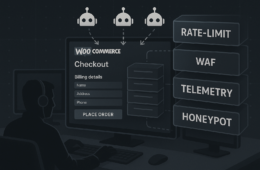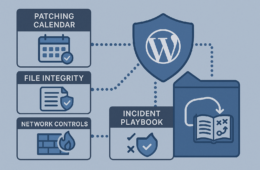

This tactical brief walks a technical founder through a prioritized threat-model approach to harden WordPress sites, turn noisy telemetry into actionable detection, and build recovery playbooks that drastically reduce incident blast radius. You’ll get clear decisions you can act on this week: what to harden first, the monitoring signals that matter, and the recovery steps that keep customers and revenue alive while you remediate.
- Threat-model start: what to protect and why
- How do you limit blast radius after a compromise?
- Phase 1 — Hardening the high-value surfaces
- Phase 2 — Detection that avoids noise and drives action
- Phase 3 — Recovery playbooks that shorten MTTD/MTTR
- Comparison: Controls, cost, and practical takeaways
- Prioritization and what to do this week
- Operational glue: reducing friction for on-call teams
- Quick incident scenarios (practical examples)
- Final urgencies — three clear priorities
Threat-model start: what to protect and why
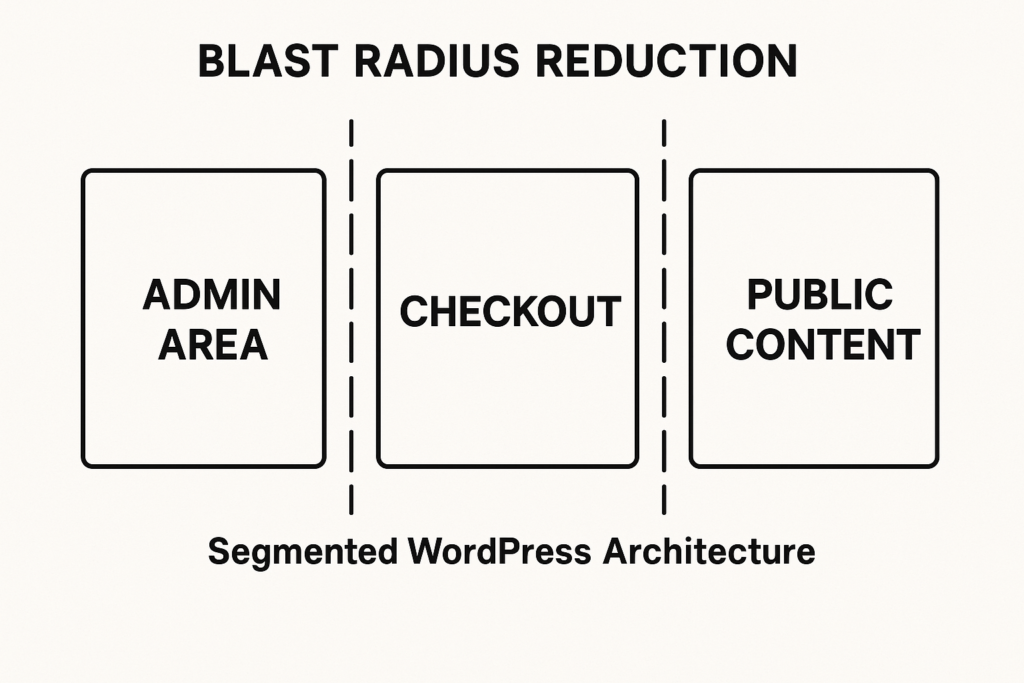
Architecture diagram showing segmented WordPress areas and containment barriers
Start by mapping high-value assets: admin accounts and privileged workflows (user, order, and payment processors), high-traffic content that drives SEO and conversions, and any checkout or payment integrations. Treat those assets as separate trust zones: admin console, transactional flows, and public content. A vulnerability in a plugin or a weak credential should never allow lateral movement from public content to checkout or admin.
Use this mental model to prioritize controls: phase 1 restricts access paths, phase 2 focuses on detection where it matters, and phase 3 automates containment and recovery.
How do you limit blast radius after a compromise?
Recovery playbook binder next to a laptop showing WordPress admin
Isolate affected zones immediately by revoking or rotating credentials for the smallest set of accounts possible, blocking the specific attack path (IP, user agent, plugin endpoint), and switching transactional flows to contingency routes where available. Speed matters: early containment reduces customer exposure and buy time for recovery steps without needing a full site lockdown.
Phase 1 — Hardening the high-value surfaces
The goal here is to raise the cost for attackers and shrink the number of successful attack vectors. For founders, implement these prioritized technical steps first.
Lock down privileged access
Eliminate shared admin accounts. Enforce least-privilege roles and use short-lived token policies where possible. For routine admin tasks, create scoped operator accounts that can’t export user tables or modify plugin code. Link: see our implementation roadmap for admin workflows in the Fight Back operator notes.
- Checklist — immediate actions:
- Enable MFA for all admin and editor accounts.
- Audit users: remove unused admin users and convert shared accounts into unique identities.
- Assign plugin/plugin-management capability only to a small, named group.
- Example: convert a shared admin account into scoped roles — create “plugin-manager” with only install/update capabilities and no user export rights.
Segment workflows and file access
Separate execution contexts: run public-facing PHP processes in a different pool or container than background jobs that touch payments or exports. Ensure upload directories have no execute permissions and that plugin/theme editors are disabled. These measures limit what an arbitrary web shell can do if it reaches an upload point.
- Implementation step: set uploads to non-executable:
- Example commands (host-level):
find /var/www/html/wp-content/uploads -type d -exec chmod 755 {} +andfind /var/www/html/wp-content/uploads -type f -exec chmod 644 {} +. - Disable file editor in wp-config.php:
define('DISALLOW_FILE_EDIT', true);.
- Example commands (host-level):
Reduce plugin exposure
Prioritize reducing exposure from plugins with known risky features (file editors, custom PHP endpoints, remote update hooks). For an actionable, founder-oriented walkthrough that helps close plugin exploit windows, see Reduce Plugin Exploit Risk Before Disclosure. Apply virtual patching or temporary feature toggles until a proper patch is available.
- Quick triage checklist:
- List top 10 installed plugins by access surface (endpoints, upload capabilities, file system access).
- Temporarily disable or put risky plugins into passive mode.
- Document any customizations or third-party integrations that rely on those plugins.
Phase 2 — Detection that avoids noise and drives action
You don’t need every log; you need the right signals and clear escalation thresholds. Replace noisy alerts with prioritized telemetry that directly maps to attack paths and recovery tasks.
Telemetry to collect first
Capture authentications (success/failure), file changes in plugin and theme directories, unexpected PHP process invocations, and outbound connections from the web host. Correlate failed logins with suspicious user-agent strings and sudden spikes in POST requests to checkout endpoints.
- High-value signals:
- Multiple failed logins followed by a successful admin login within a short window.
- File-change events under
/wp-content/pluginsor/wp-content/themes. - New or unexpected PHP processes spawning long-running execs or outbound connections to non-whitelisted IPs.
Turn alerts into playbook triggers
Map each high-priority alert to a single playbook: who acts, what is frozen, and what telemetry to capture for forensics. If an alert indicates a file modification under /wp-content/plugins, the playbook should include immediate file snapshots, temporary disabling of the plugin, and a narrow credentials rotation for accounts with plugin management rights.
- Example playbook mapping:
- Trigger: plugin directory change. Actions: snapshot, disable plugin, capture process list, rotate plugin-management API keys.
- Trigger: abnormal checkout POST surge. Actions: throttle traffic, enable fallback payment route, snapshot DB transactions since X minutes.
Where telemetry commonly fails
Many sites log everything but don’t index for query or retention, so alerts either never materialize or arrive too late. Our Operator Notes on telemetry explain common mistakes and how to turn noisy alerts into concrete remediation — see Telemetry Mistakes.
Phase 3 — Recovery playbooks that shorten MTTD/MTTR
Containment then restore: your playbooks must prioritize restoring transactional capability and preserving evidence. The playbook language should be short, imperative, and assigned to named roles so teams don’t hesitate during an incident.
Containment playbook example
Action items should include: snapshot affected directories and DB exports, rotate API keys scoped to the smallest privilege, disable inbound traffic to compromised endpoints, and enable maintenance mode for parts of the site rather than full shutdown when possible. The objective: stop exfiltration and stop fraudulent transactions.
- Containment checklist:
- Take immutable snapshots of wp-content and the DB.
- Temporarily disable affected plugin(s) via CLI or WP-CLI:
wp plugin deactivate plugin-name. - Block offending IPs and user agents at the web server or CDN.
- Rotate keys for payment providers and webhook tokens immediately if compromised endpoints are suspected.
Recovery playbook example
Recovery should follow pre-defined tiers: Tier 1 restores checkout and payment routing on a clean host or fallback instance; Tier 2 restores admin access with rotated credentials and multi-factor enforcement; Tier 3 performs forensic analysis and reintroduces plugins one at a time. Automate snapshots and rollback points to make this practical.
- Recovery steps (practical implementation):
- Provision a clean fallback instance or container with current code and a restored DB snapshot that predates the compromise.
- Bring checkout online only after verifying webhooks and payment keys are rotated and tested with a small transaction.
- Reintroduce plugins one-by-one, checking file integrity and telemetry after each re-enable.
Why practice the playbook
Run tabletop drills quarterly and record time-to-contain and time-to-restore. The friction points that show up in drills are your next hardening priorities: slow exports, unclear role handoffs, or missing snapshot automation.
Comparison: Controls, cost, and practical takeaways
| Control | Operational Cost | Impact on Blast Radius | Practical Takeaway |
|---|---|---|---|
| Scoped admin roles | Low | High | Start here: immediate, low-friction reduction in lateral movement. |
| File-change monitoring | Medium (storage+alerts) | High | Detects web shells early — tune to avoid noise. |
| Segmentation (process/host) | Medium-High | Very High | Best long-term; isolate checkout and admin processes. |
| Automated rollback snapshots | Medium | Medium-High | Makes recovery predictable; automate verification. |
Practical takeaway: implement low-cost, high-impact measures first (roles, file monitoring), then add segmentation and rollback automation as part of a quarterly roadmap. For step-by-step guidance on defending checkout flows and high-value content, reference the operator blueprint: Operator Blueprint.
Prioritization and what to do this week
Week 1: enforce unique admin accounts, enable MFA, and disable remote file editors. Week 2: deploy file-change monitoring and create one playbook mapped to that alert. Week 3: implement scoped credential rotation flows and test a rollback snapshot. Maintain a single source-of-truth runbook that lists the steps and contact roles.
- Week-by-week checklist (practical):
- Week 1: Audit users, enable MFA, disable file editor (
DISALLOW_FILE_EDIT), remove unused plugins. - Week 2: Install file integrity monitoring, configure retention for 90+ days, and map an alert to a one-page playbook.
- Week 3: Configure automated snapshots before plugin updates and test a restore on a staging environment.
- Week 1: Audit users, enable MFA, disable file editor (
Operational glue: reducing friction for on-call teams
Documentation and automation are the glue that reduce blast radius. Keep a short, versioned recovery runbook and a single-click containment switch for the most common incidents so technical founders and small teams can act quickly without deep ops overhead. For a focused tactical teardown on mistakes that let malware and web shells into critical flows, see Teardown.
When you need a practical way to implement these controls quickly, consider using Hack Halt Inc. to automate monitoring, scoped credential workflows, and snapshot rollback orchestration: See pricing and get started. For documentation on specific features and settings, consult Hack Halt documentation.
Quick incident scenarios (practical examples)
Scenario A — web shell found in uploads: containment should be immediate and narrow. Actions: snapshot uploads, revoke any recently issued upload tokens, set uploads to no-exec, disable affected plugin endpoints, and scan for other indicators. Restore checkout on a clean host while you perform forensic analysis.
Scenario B — credential stuffing leads to admin access: immediately rotate admin credentials, force MFA reset, check recent admin actions for injected code or new users, and replay relevant logs to determine lateral movement. If payment keys were used after the compromise, rotate those keys and validate recent transactions with the processor.
Final urgencies — three clear priorities
1) Lock and segment access: unique admin accounts, MFA, and scoped roles. 2) Deploy signal-driven detection: file changes, auth anomalies, and outbound connections prioritized into single-response playbooks. 3) Automate rollback and test recovery: snapshots, staged restores, and quarterly drills. Each of these reduces blast radius materially and is practical for a technical founder to implement without enterprise overhead.
Further reading
For detailed hardening and layered defense playbooks, consult the layered defenses collection and the founder-focused plugin risk walkthrough at Hack Halt: Layered Defense Teardown and Reduce Plugin Exploit Risk. If you want a direct operator roadmap for admin workflows, see our Hardening Admin Access notes. For stopping brute-force and credential stuffing specifically, review the practical roadmap: Stopping Brute-Force & Credential Stuffing.
Closing note for founders
Treat blast radius reduction as the single best ROI for limited security budgets: small, tactical investments in segmentation, telemetry, and recovery playbooks buy time, preserve revenue, and keep customers safe. Act now—the faster you contain, the less you rebuild later.