
Firewall protection for WordPress
Protect your WordPress site from modern cyber threats
Real-time firewall, malware scanning, vulnerability monitoring and intrusion prevention — running before WordPress ever processes the request.
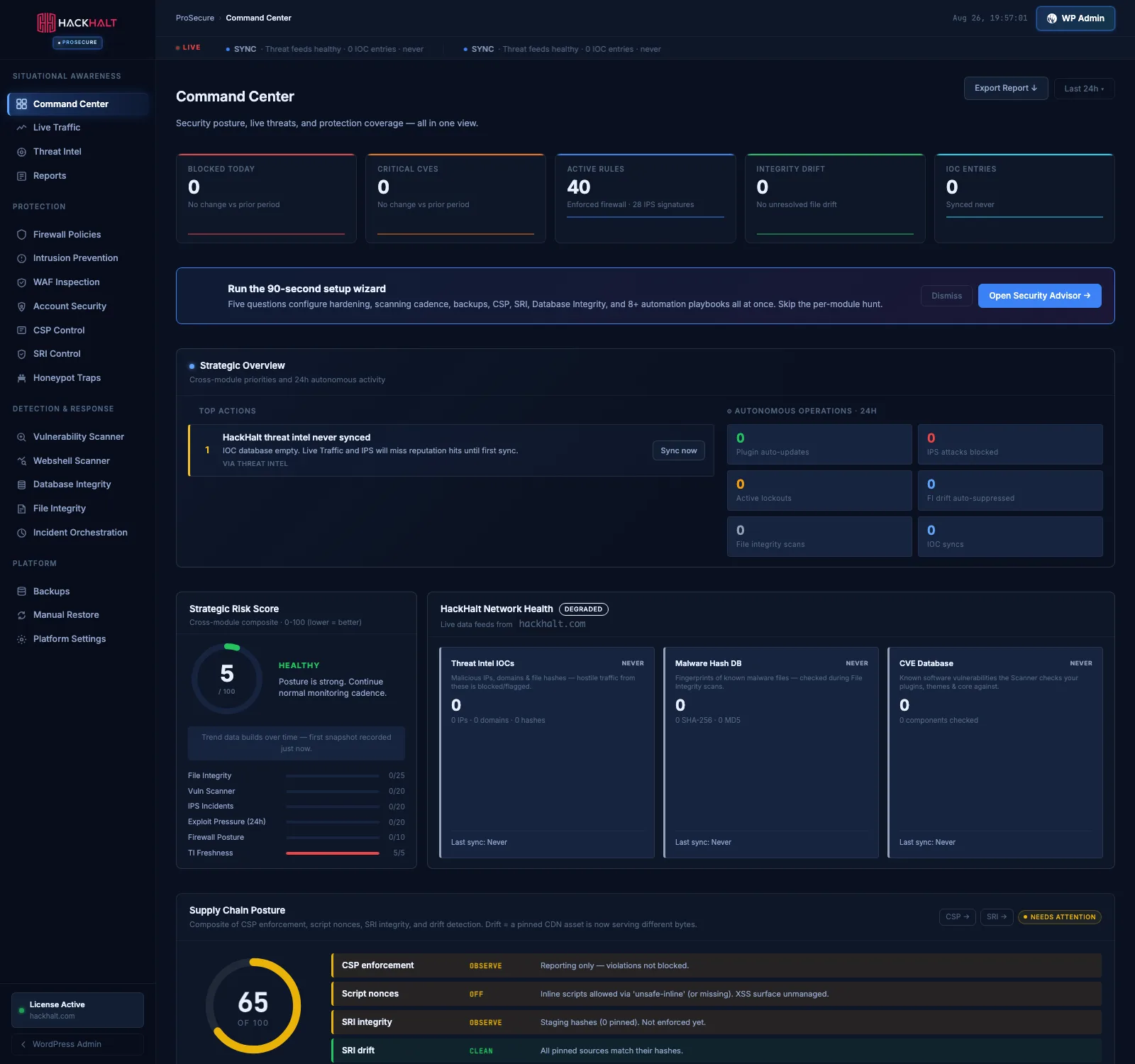
Your entire security posture in one screen
The Command Center is the first thing you see after activation: live threats, protection coverage, a strategic risk score and what to fix next — without opening a single sub-page.
- RUPOST/wp-login.phpCredential stuffingBlocked
- CNGET/wp-content/uploads/x.phpWebshell signatureBlocked
- USGET/pricing/—Allowed
- NLPOST/xmlrpc.phpXML-RPC amplificationBlocked
- BRGET/?author=1User enumerationBlocked
- DEGET/products/prosecure/—Allowed
- INGET/wp-admin/admin-ajax.phpRate limitThrottled
- FRGET/.envSecret probingBlocked
Advanced WordPress security for modern cyber threats
Protecting websites from malware infections and unauthorized access attempts — from real-time firewall and vulnerability monitoring to malware removal and incident response.

WordPress firewall protection
Requests are inspected and filtered before WordPress processes them, under policies you control.

Malware prevention and removal
Webshell and file integrity scanning surface injected code, with one-click restore when something lands.

Access control and login protection
Brute-force lockouts, credential-stuffing defence, and multi-factor enforcement by role.

Continuous security monitoring
Live traffic showing the country, method, path and decision taken on every single request.

Secure backup and recovery
Scheduled backups and one-click restore, so recovering is a decision rather than a project.

WordPress security hardening
Guided hardening closes the configuration gaps attackers rely on, and keeps checking them.
Protection, measured
Every figure below is read from the product’s own capability registry, not written into this page.
99.9%
Threat detection and prevention rate
Across protected installs
20
Security controls compared
Free, Pro and ProSecure
5
Capability groups covered
Protect, detect, respond, recover
4
Plans, including a free tier
No trial expiry
Everything in one plugin
Nine of the controls Hack Halt runs on every request. The tier each one starts at is read from the product itself, so nothing here can drift from what you actually get.
Real-time firewall
Requests are matched against firewall policy before WordPress loads a single plugin. You control the rules; the defaults are safe on day one.
From Free
Intrusion prevention
Repeat offenders are locked out automatically. Credential stuffing and enumeration are recognised as campaigns, not as isolated failed logins.
From Free
WAF request inspection
Payload-level inspection catches injection and traversal attempts aimed at a vulnerable plugin, before that plugin ever runs.
From ProSecure
File integrity monitoring
Every file compared against a known-good baseline. A changed core file surfaces as drift with a diff, not as a vague warning.
From Pro
Webshell scanning
Behavioural detection for injected PHP that signature scanners miss — obfuscated eval chains, uploaded shells, backdoored plugin files.
From ProSecure
Vulnerability scanning
Your plugins, themes and core checked against published CVEs, so you learn about a disclosure before an automated scanner does.
From Free
Threat intelligence
Reputation data shared across every protected site. An attacker blocked on one installation is already known to yours.
From Pro
Incident orchestration
Related signals are correlated into one incident with a response path, instead of a scroll of disconnected log lines to interpret yourself.
From ProSecure
Backups and restore
Scheduled backups with one-click restore, so recovering from an incident is a decision someone makes rather than a project.
From ProSecure
Inside ProSecure
ProSecure is not a longer feature list, it is a full operations surface. Four groups and nineteen screens, mirrored exactly as the plugin registers them — what you read here is what you get after activation.
Situational awareness
What is happening right now, in one place.
- Command Center
- Live Traffic
- Threat Intel
- Reports
4 surfaces
Protection
The layers a request passes before WordPress sees it.
- Firewall Policies
- Intrusion Prevention
- WAF Inspection
- Account Security
- CSP Control
- SRI Control
- Honeypot Traps
7 surfaces
Detection & response
Finding what got in, and doing something about it.
- Vulnerability Scanner
- Webshell Scanner
- Database Integrity
- File Integrity
- Incident Orchestration
5 surfaces
Platform
Recovery and the controls behind everything else.
- Backups
- Manual Restore
- Platform Settings
3 surfaces
How the network defends you
Three things a single-site plugin cannot do, because they only work when every protected site contributes what it sees.

Global threat intelligence
Reputation data collected across every protected site, so an attacker blocked on one installation never gets a first attempt at yours.

Honeypot deception
Decoy endpoints only an automated scanner would touch. Anything that requests one has identified itself before it finds a real target.

Attack-chain correlation
A failed login, an admin-path probe and an odd user agent are unremarkable alone. Together they are one incident, and are handled as one.
Questions people ask first
Is the free tier a trial?
No. It has no expiry, no request cap and no feature disabled to make it feel broken. It requires a free registration tied to your domain, and that is the only condition.
Will it slow my site down?
Visitor-facing overhead is a handful of database queries on an uncached request and nothing at all on a cached one. Request inspection happens before WordPress loads its plugins, which costs less than the page it protects.
Can it lock me out of my own site?
Lockouts apply to repeated failed authentication, and your own address can be allowlisted. An allow decision is terminal across every layer, so an allowlisted address is never caught by a later rule.
Do I need to understand security to run it?
No. A setup wizard configures hardening, scanning cadence, backups, CSP and the automation playbooks from five questions, and the Security Advisor ranks whatever is left by impact rather than listing everything at once.
What happens when something does get through?
Incident orchestration correlates the related signals into a single case with a response path, and ProSecure adds backups with one-click restore so recovery is a decision rather than a rebuild.
Does it work alongside another security plugin?
It can, but two firewalls inspecting the same request duplicate the work and make it harder to tell which one made a decision. Hack Halt is built to be the layer rather than one of several.
Latest from the Security Hub
Research, disclosures and incident write-ups from the team.
-
Layered Defense for Malware & Web Shells: A Practical Threat-Model Walkthrough
A high-urgency, technical founder’s blueprint to stop malware drops and web shells on WordPress. Prioritized controls, quick detection, and an…
-
How WordPress Hacks Actually Happen: A Mistakes-to-Avoid Teardown for WooCommerce Admins
A teardown focused on how attackers reach privileged WordPress admin access on WooCommerce sites — the common operator mistakes that…
-

Operator Blueprint: Reduce Plugin Exploit Risk During Disclosure Windows
A step-by-step operator blueprint for agencies to harden multiple client WordPress sites and reduce plugin exploit risk during disclosure windows…
There is no reason to leave your site unprotected.
Install Hack Halt Free, register your domain, and have a firewall running in minutes.