
This playbook is for WordPress site owners who must defend valuable pages and checkout flows from automated abuse without a full SOC. It focuses on controls you can realistically implement, verify, and maintain: targeted rate limits, precise telemetry, file integrity checks, privilege hardening, and containment patterns. If you want a quick way to run these controls with minimal configuration, consider Hack Halt Inc. at Hack Halt Inc. for guided implementation and documentation.
- Why focus on automated abuse and checkout flows?
- How do you prioritize protections for high-value endpoints?
- Which controls give the best ROI?
- Targeted controls and how to implement them
- Comparison: quick controls vs deeper changes
- Actionable checklist: immediate steps (start here)
- What telemetry should you watch closely?
- Incident mini-case study: automated checkout abuse contained in 90 minutes
- How do you validate controls are working?
- Operational playbook for small teams
- 30/60/90 implementation plan
- Further reading and relevant playbooks
- Closing: implement quickly, iterate often
Why focus on automated abuse and checkout flows?
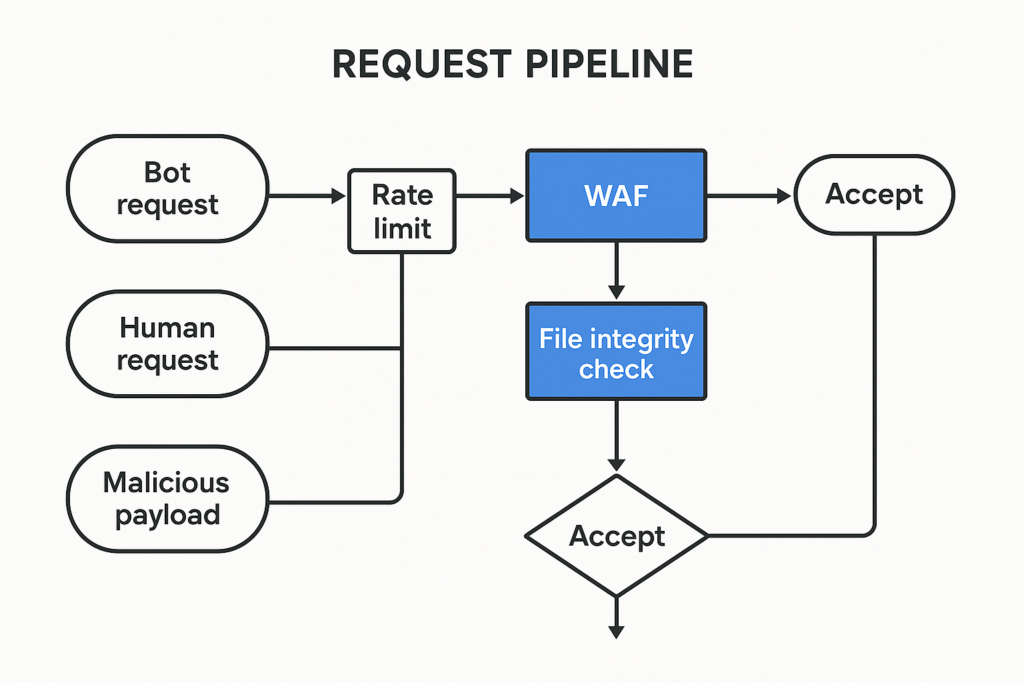
Request pipeline flowchart with defenses annotated
Automated abuse — scraping, credential stuffing, automated checkout exploits, and web shell deployment — targets high-value pages because those routes lead to revenue and data. A successful automated compromise of a checkout page can lead to card exposure, order manipulation, or persistent malware that survives normal updates. The risk is both immediate (fraud, chargebacks, data exposure) and ongoing (backdoors and web shells that recur). Protecting these flows should be tactical and repeatable so small teams can defend without expensive tools or large staffing.
How do you prioritize protections for high-value endpoints?
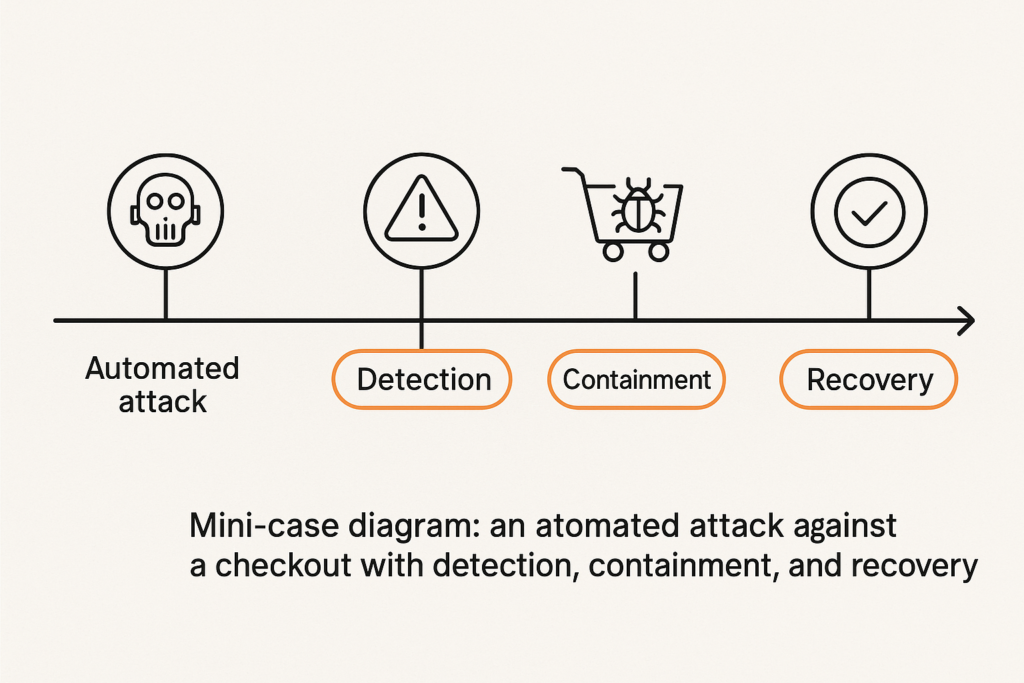
Incident timeline showing detection and containment for a checkout attack
Start by mapping the traffic patterns and risk: which endpoints handle payments, access to gated content, or third-party callbacks. Tag those endpoints at the web and application layer so logging, rate limits, and anomaly detection apply selectively. Apply stricter controls to these tags first, then expand. Prioritization rubric:
- Critical: endpoints that accept payment information, card tokens, or trigger fulfillment.
- High: webhooks, subscription renewals, and user account management pages.
- Medium: gated content and membership resource endpoints.
Tagging lets you focus detection and containment where it matters, and simplifies the work to defend checkout flows WordPress sites rely on.
Which controls give the best ROI?
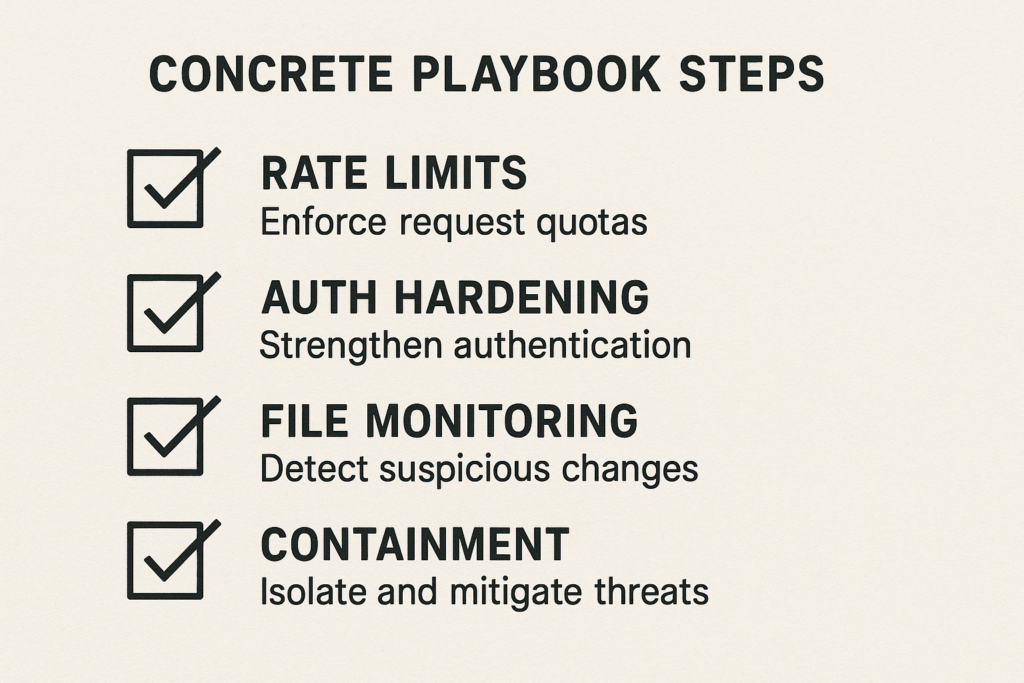
Playbook checklist visual with checkboxes for controls
The direct answer: targeted rate limiting, privilege hardening, and file integrity monitoring give the highest return for effort. Each control closes a common automated attack vector quickly and can be verified with logs. Combined, they form a layered defense that significantly reduces both attack surface and impact.
Targeted controls and how to implement them
1) Tag and isolate high-value routes
Inventory checkout URIs, payment webhooks, subscription endpoints, and content-restricted pages. Use server or application-layer routing rules to mark requests (headers or route metadata) so downstream systems treat them differently for rate limits and logging.
Implementation steps (example):
- Inventory: export a list of endpoints from your routing or plugin configuration (checkout, /wp-json/* endpoints used by apps, webhook URLs).
- Tag at the application layer: add a header for tagged responses so reverse proxies and WAFs can match them. Example PHP snippet (place in a small mu-plugin or theme functions):
<?php
add_action('template_redirect', function() {
    if (function_exists('is_checkout') && is_checkout()) {
        header('X-High-Value: checkout');
    }
});
?>- Tag at the proxy layer: if you use NGINX or a CDN, map known URIs to a metadata header so upstream tooling applies stricter rules.
- Log separation: configure logs for these requests to a separate stream or file to speed triage.
2) Rate limiting and progressive challenges
Apply conservative thresholds first (e.g., 30 requests/minute per IP to checkout endpoints). Instead of bluntly blocking, escalate: 1) slow responses, 2) challenge (CAPTCHA or JavaScript challenge), 3) temporary block. Log every escalation to a separate stream for quick review.
Implementation checklist and examples:
- Define baselines by measuring peak legitimate traffic for each endpoint for 7–14 days.
- Configure progressive actions: 30 req/min → slow responses (add 200ms), 60 req/min → CAPTCHA, 200 req/min → 15-minute block.
- Test with synthetic clients to ensure legitimate users aren’t blocked (simulate logged-in customers and mobile clients).
- Consider cookie or token-based exemptions for known good clients (e.g., your mobile app or trusted webhooks).
Practical example (conceptual NGINX approach): create a rate-limiting key that uses IP + route tag and map the header to a limit zone that targets checkout routes. If you use a CDN/WAF, mirror these thresholds there and forward the escalation signals back to your origin logs.
3) File integrity and web shell hunting
Monitor all writes to wp-content, themes, and plugins. Alert on new or modified PHP files outside expected deployments. When you detect an unexpected write, snapshot the file and directory, quarantine the file, and run a memory/ephemeral-process check before deletion.
Implementation steps:
- Initial baseline: generate a manifest of existing files and checksums for wp-content, wp-includes, and active theme/plugin directories. Store the manifest offline.
- Continuous monitoring: schedule periodic checksum comparisons (daily) and a file system watcher for real-time alerts on new .php writes.
- On alert: copy the suspicious file to an offline quarantine directory, set permissions to non-executable (e.g., chmod 400), and take a snapshot of surrounding files. Record the event in an incident log.
- For hosting with shell access: run a short process and network scan on the host to detect any in-memory persistence before cleanup.
Small example command pattern (conceptual):
# snapshot
mkdir -p /var/quarantine/$(date +%F_%T)
cp -a /var/www/html/wp-content/uploads/suspicious.php /var/quarantine/$(date +%F_%T)/
chmod 400 /var/quarantine/*
Comparison: quick controls vs deeper changes
| Control | Time to implement | Impact on automated abuse | Practical takeaway |
|---|---|---|---|
| Targeted rate limits | Hours | High for scripted attacks | Start here: fast, reversible, measurable. |
| File integrity monitoring | Hours to a day | High for post-exploit persistence | Detects web shells and unauthorized writes early. |
| Privilege and session hardening | Days | Medium–High (reduces impact) | Limits abuse from compromised accounts. |
| Application redesign (tokenized flows) | Weeks | Very high (long-term) | Worth planning but not for immediate mitigation. |
Actionable checklist: immediate steps (start here)
- Tag endpoints: Mark checkout, webhook, and premium content routes in routing rules and logs.
- Apply conservative rate limits: Progressive throttling per IP and cookie; monitor for false positives.
- Enable file integrity monitoring: Alert on new/changed PHP files in content, themes, and plugins.
- Harden admin access: Force MFA for all admin roles, rotate stale accounts, and enforce session timeouts.
- Quarantine unknown files: Snapshot and quarantine any unexpected PHP files before deletion.
- Prepare a containment toggle: Add an admin-only checkout maintenance switch to quickly disable checkout when under attack.
- Log to separate streams: Send high-value endpoint logs to an isolated channel for faster triage.
- Document and test recovery: Ensure backups and DB snapshots are restorable and tested.
- Make playbooks executable: Create short runbooks that any on-call team member can execute in 15 minutes (rate-limit, quarantine, rotate keys).
What telemetry should you watch closely?
Look for spikes in POST requests to checkout endpoints, repeated failed payment attempts, sudden increases in file writes under wp-content, and new admin-user creations. Tune alerts so the first responder gets concrete remediation steps, not noise. If you need implementation details for monitoring and configuration, consult the Hack Halt documentation for targeted controls at the Hack Halt documentation.
Telemetry examples to capture:
- Request rate per endpoint, per IP, and per user-session.
- Payment gateway error rates and failed token exchanges.
- File create/modify events in monitored directories with file owner and source process.
- Privilege changes: new admin users, role escalations, and suspicious session creations.
Incident mini-case study: automated checkout abuse contained in 90 minutes
A mid-sized shop saw a sudden spike of scripted POST attempts to /checkout and a surge of small-value orders. The admin followed the checklist: tagged the endpoint, applied aggressive progressive rate limits, and toggled checkout to maintenance. File integrity monitoring flagged a newly-written PHP file in wp-content/uploads; the team quarantined the file and rotated API keys. Using isolated logs they identified the abused webhook and blocked the originating IP ranges. The site restored checkout after a credential rotation and a clean file restore. Lessons: tag endpoints early, stream logs to a separate channel, and have a one-click containment toggle.
For a deeper tactical view of how attacks unfold and how telemetry should feed remediation, see How WordPress Hacks Actually Happen — A Roadmap to Turn Noisy Telemetry into Concrete Remediation and How WordPress Hacks Actually Happen: A Tactical Threat-Model.
How do you validate controls are working?
Run targeted synthetic tests and low-risk load tests against the tagged routes to verify rate-limiting and challenges trigger. Validate alerts by creating controlled test writes (non-executable files) to the monitored directories and confirming they generate the expected alerts and snapshots. All validation should be logged and reviewed.
Validation checklist:
- Run a synthetic user journey for checkout with expected headers and tokens to confirm no unintended block.
- Simulate scripted POST bursts from a test IP to ensure progressive throttling escalates correctly.
- Create a non-executable test file in wp-content to prove file integrity alerts and quarantine workflow.
- Document all tests, timestamps, and results so auditors and future responders understand behavior.
Operational playbook for small teams
1) Triage runbook
On alert: identify the affected endpoint, snapshot logs, isolate the traffic source, apply rate limits, and, if necessary, switch the checkout to maintenance. If you detect unknown PHP files, quarantine and snapshot before any deletion.
Short triage checklist:
- Confirm alert validity (false positive check).
- Snapshot logs and identify request vectors (IP, UA, referrer).
- Apply targeted rate limit and add challenge.
- If confirmed, toggle checkout maintenance and communicate to stakeholders.
2) Containment and recovery
Containment: apply route-specific blocks and rotate secrets. Recovery: restore verified clean files from an offline backup or rebuild from a known-good deployment. Run a short smoke test on the checkout before re-enabling.
Containment steps:
- Block offending IP ranges and related ASN where appropriate.
- Rotate API keys, payment gateway secrets, and any exposed tokens.
- Quarantine and preserve evidence; keep copies for forensic review.
- Restore from a vetted backup or redeploy from the canonical repository; never re-enable checkout until smoke tests pass.
3) Post-incident steps
Collect lessons learned, update thresholds and telemetry, and automate the playbook steps where possible. Add new allowlists and refine rate limits based on the incident data. Update runbooks and train staff on the new procedures.
30/60/90 implementation plan
To make progress without overwhelming teams, adopt a phased plan:
- 30 days: Inventory endpoints, add header tagging, implement basic rate limits, and enable file integrity baseline.
- 60 days: Add progressive challenge workflow, quarantine automation for suspicious files, and enforce MFA for all admin users.
- 90 days: Harden session and role management, integrate alerts into on-call tooling, and run full incident tabletop exercises that simulate defend checkout flows WordPress incidents.
Further reading and relevant playbooks
These resources expand on techniques in this article: tactical threat-modeling for high-value content (How WordPress Hacks Actually Happen: A Tactical Threat-Model), layered defense teardowns for WooCommerce checkouts (Teardown: Mistakes That Let Malware and Web Shells Reach WooCommerce Checkouts), reducing plugin exploit risk (Reduce Plugin Exploit Risk Before Disclosure), and operator-focused recovery playbooks (Operator Notes: Reduce Incident Blast Radius).
Closing: implement quickly, iterate often
Start by tagging endpoints, applying conservative rate limits, and enabling file integrity monitoring — these yield quick wins. Harden privileged accounts and prepare containment toggles for checkout flows. If you want a direct way to implement these controls with guided documentation, configuration templates, and operational runbooks, deploy Hack Halt’s controls via the pricing page: Start with Hack Halt Inc.