
IT generalists responsible for uptime and incident response face the same daily frustration: noisy WordPress telemetry that buries high-risk alerts. This hardening guide turns alarm fatigue into a sequence of prioritized actions — quick wins you can do in minutes and deeper fixes that remove attack paths. Read this as a practical roadmap to triage, contain, and permanently reduce the signals that really matter.
- Why telemetry gets noisy and what that noise hides
- How do WordPress hacks actually start in the wild?
- The typical attack chain: reconnaissance to persistence
- Actionable checklist: quick wins and tactical fixes
- Quick wins you can do in 10–30 minutes
- Deep fixes: architecture, patching, and continuous reduction of blast radius
- Incident mini-case study: web shell found in uploads
- How to automate and document these controls?
- Where to focus monitoring so alerts are useful?
- Final recommendations and a practical way to implement controls
- Further reading and related guides
- FAQ
Why telemetry gets noisy and what that noise hides
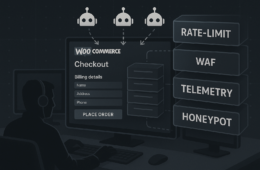
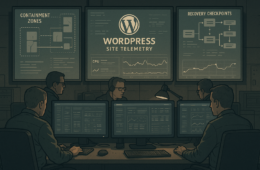
Telemetry multiplies because plugins, themes, WAFs, and external scanners all emit overlapping alerts. That duplication is useful only when you map alerts to the consequence: who gains privilege, what files changed, or whether checkout/payment flows are affected. Without mapping, responders chase false positives instead of closing real exposures.
Common noisy sources
Heartbeats, core auto-updates, plugin scanners, and developer debug logs often create repeated events. Treat these as context, not priority, until they correlate with high-impact actions like new admin users or unexpected file writes.
What correlated signals look like
High-priority signals are short and clear: file writes to wp-content/.php, new administrator accounts, outbound connections initiated by PHP, or modified checkout templates. Correlate these with time and source IP to assess blast radius fast.
How do WordPress hacks actually start in the wild?
Most hacks begin with a low-skill reconnaissance or credential stuffing attempt and escalate when attackers find writable code paths or privileged sessions. In practice, one exposed plugin or a reused password bridges reconnaissance to persistent access.
The typical attack chain: reconnaissance to persistence
Understanding the chain helps you place remediation steps where they break the attacker’s flow.
Reconnaissance
Automated scans and probes enumerate plugins, versions, and exposed endpoints. Reduce this surface by removing unused plugins and hiding version fingerprints.
Initial compromise
Initial access often arrives via vulnerable or outdated plugins, credential reuse, or misconfigured endpoints that accept file uploads. Treat all plugin-related telemetry as high-signal if accompanied by file write events.
Lateral movement and privilege escalation
Once an attacker has an account or a file write, they attempt to create backdoors, add admins, or modify checkout flows to capture data. Monitor admin creation and any unexpected PHP file changes closely.
Persistence
Web shells, scheduled tasks, or modified theme templates provide persistence. File-system monitoring plus immutable backups limit persistence opportunities and speed recovery.
Actionable checklist: quick wins and tactical fixes
This checklist is what I run through first in an incident or during a routine hardening sprint. Complete the steps in order; earlier steps reduce blast radius so later changes aren’t made on a compromised account.
- Expire active sessions and rotate passwords for privileged accounts immediately.
- Snapshot the filesystem and database for forensics and store them off-box.
- Search for recent file writes under wp-content, uploads, and theme folders and quarantine suspicious files.
- Lock down file permissions for wp-config.php and core files; ensure PHP process cannot write to core directories.
- Check for new admin users and disable or reset any you don’t recognize.
- Block attacker IPs at the edge and enable fail2ban-like rules for repeated login failures.
- Patch vulnerable plugins/themes on a staging host and deploy tested updates to production quickly.
- Document the incident, update your runbook, and schedule a post-mortem with owners and developers.
Quick wins you can do in 10–30 minutes
These steps reduce immediate exposure without a full rebuild.
Expire sessions and rotate keys
Force logout and issue new API keys for integrations. This removes live attacker footholds and is low-risk operationally.
Snapshot now, ask questions later
Take immutable snapshots of files and databases before any destructive action. You need a clean forensic baseline before restoring or applying fixes.
Limit admin surface area
Disable unused admin accounts, add IP restrictions for admin pages if possible, and require MFA for all privileged users.
Deep fixes: architecture, patching, and continuous reduction of blast radius
Quick wins are triage; deep fixes change the environment so attacks fail earlier and alerts become more meaningful.
Harden upgrade and patch workflows
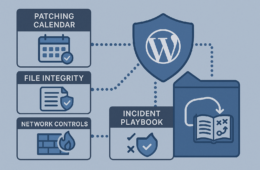
Move from ad-hoc updates to scheduled, tested patch cycles on staging with automated rollout gates. Keep a short patch window for critical fixes and version-tracking telemetry so you can prove when a plugin was updated.
Implement least privilege and role separation
Separate content editors from platform administrators and reduce the number of accounts that can install plugins or change PHP files. Use role audits and remove unused capabilities.
File integrity and immutable backups
Monitor file hash changes and send alerts only for changes to critical paths. Store backups off-site in a write-once format so attackers cannot modify historical snapshots.
Instrumented alerting: reduce noise, raise signal
Create an alert taxonomy that ranks events by potential blast radius. For example, new admin user = high; login failure = low. Tune retention and forwarding in your monitoring to keep high-value telemetry searchable.
Incident mini-case study: web shell found in uploads
Context: an operations team saw a surge in PHP file writes originating from the uploads directory. Triage: they immediately expired sessions and rotated admin credentials (quick win). Forensics: they took snapshots and discovered an obfuscated PHP file that called out to a remote payload. Containment: the site was put behind maintenance mode, the file removed from production, and a staging-only patch was applied to the plugin that allowed upload of executable files. Post-incident: the team hardened file permissions, audited plugins, and added file-write alerts that correlated with admin events. This sequence turned noisy write alerts into an actionable kill-chain break.
How to automate and document these controls?
Start by codifying the quick wins into scripts and orchestration tasks, and store them in your runbook. For settings and features that Hack Halt addresses, follow the step-by-step guidance in the documentation to automate detection and remediation: Hack Halt documentation. That documentation helps you map alerts to the remediation playbooks above.
Where to focus monitoring so alerts are useful?
Prioritize events that directly expand attacker capability: file writes to executable directories, admin account changes, plugin/theme installs or updates initiated by non-admin hours, and outbound connections from PHP. Forward these to your incident queue first and batch low-priority noise for later review.
Final recommendations and a practical way to implement controls
Convert your telemetry into a prioritized remediation list: stop sessions that matter, snapshot evidence, quarantine file changes, then patch and harden. If you want a single place to automate and operationalize those controls, Hack Halt Inc. provides detection-to-remediation flows and orchestration to implement the exact steps in this guide — see pricing and plans to get started: Hack Halt Inc. pricing.
Further reading and related guides
For deeper playbooks and teardowns on reducing blast radius and layered defenses, read the tactical explainer on How WordPress Hacks Unfold: Turning Noisy Telemetry into Concrete Remediation, the walkthrough to Reduce Incident Blast Radius: A Tactical Threat-Model Walkthrough for WordPress Founders, and a targeted teardown on Mistakes That Let Malware and Web Shells Reach WooCommerce Checkouts — A Layered-Defense Fix.
FAQ
Q: What immediate evidence should I collect after detection?
A: Export webserver access/error logs, PHP process lists, current plugin and theme lists, and a file-system snapshot.
Q: Should I rebuild the site after a compromise?
A: Rebuild is safest if you cannot confidently remove persistence; preserve snapshots for forensic analysis before rebuilding.
Q: How do I keep alerts actionable without missing attacks?
A: Rank alerts by blast radius and require correlation of at least two high-signal events (e.g., file write + new admin) before triggering a full incident response.
Q: Who should be on the incident call for a WordPress compromise?
A: An IT operator, the platform owner, a developer familiar with deployment, and the person responsible for backups; ensure roles are pre-assigned in your runbook.