Operators responsible for uptime and patching need a straight, actionable plan to stop malware and web shells before they escalate. This guide gives IT generalists a layered-defense roadmap: quick wins you can apply in minutes plus deep fixes to prevent repeat incidents. Where it helps, I link to tactical internal resources and to Hack Halt Inc. for implementing controls fast.
- Why layered defense matters for WordPress
- How do I contain a web shell incident quickly?
- Prevention: hardening basics (quick wins)
- Detection and telemetry: what to collect and why
- Actionable containment checklist
- Recovery and post-incident hardening (deep fixes)
- Incident mini-case study: fast containment stopped a checkout compromise
- Implementation roadmap: quick wins vs deep fixes
- Operational tips and realistic examples
- Where Hack Halt Inc. fits into this roadmap
- Final checklist and next steps for IT generalists
- FAQ
Why layered defense matters for WordPress
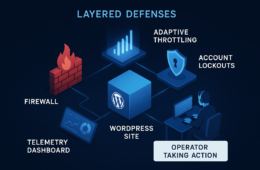
WordPress sites are composed of multiple moving parts — core, themes, plugins, PHP, and hosting. A successful attack rarely depends on just one failure; it exploits chains: a plugin flaw, weak admin controls, missing telemetry, and weak backups. Layered defenses remove single points of failure so an exploit in one layer doesn’t let attackers reach the checkout, admin, or customer data.
How do I contain a web shell incident quickly?
Begin containment immediately by isolating the site from public traffic, preserving logs and filesystem snapshots for forensics, and rotating all privileged credentials. After these steps you can remove or quarantine suspicious files and restore from a vetted backup while you harden remaining weaknesses.
Prevention: hardening basics (quick wins)
Start with controls that reduce attack surface and improve detection without heavy architecture changes.
Secure update and patching cadence
Enforce automated updates for core and themes where safe, and schedule weekly checks for plugin updates. For critical environments, test plugin updates in staging before promoting to production.
Least-privilege admin workflows
Restrict admin access to named accounts, remove unused admins, and require MFA. Document emergency access procedures and make role changes auditable.
Plugin and theme hygiene
Remove unused plugins and themes, and favor actively maintained components. During disclosure windows, restrict installs and updates while you monitor for exploit attempts. See the operator playbook on reducing plugin exploit risk: Reduce Plugin Exploit Risk Before Disclosure.
Detection and telemetry: what to collect and why
Detection is only useful if telemetry maps to action. Collecting a few signal types and correlating them will expose web shell patterns and suspicious changes quickly.
Essential logs
Collect HTTP access logs, PHP errors, and server auth logs centrally. Retain at least 30 days to support investigations and patterns across days.
File integrity and upload monitoring
File integrity alerts that detect new or modified PHP files in writable web directories are high-value. Pair these alerts with recent POST requests to those paths to prioritize investigation.
Admin and session telemetry
Audit admin logins, failed attempts, password resets, and session creations. Correlate anomalous admin activity with file changes or new endpoints.
Actionable containment checklist
Use this checklist sequentially during containment. Execute steps in the order shown and preserve evidence before destructive actions.
- Enable maintenance mode and restrict traffic at the load balancer or firewall.
- Snapshot disk and memory (if possible) and export logs to a secure host.
- Rotate all admin and service credentials, disable compromised accounts.
- Search for recently added/modified PHP files and quarantine matches.
- Restore from a vetted backup if integrity is confirmed; do not restore backups that predate compromise identification.
- Validate removal with a second independent scan and increase monitoring retention.
This checklist mirrors operator playbooks we reference in our documentation; for configuration steps and product-level settings see the Hack Halt documentation hub for guided steps and screenshots: Hack Halt documentation.
Recovery and post-incident hardening (deep fixes)
After containment and restoration, invest in fixes that prevent the same chain of exploit from recurring.
Root cause analysis and remediation
Identify how the attacker got in (vulnerable plugin, credential stuffing, misconfiguration). Use log correlation and file timestamps to build a timeline; document the root cause and the remediation performed.
Harden deployment pipelines
Lock down who can deploy code to production, require code review, and separate build from runtime credentials. Introduce immutability where possible so runtime file writes are limited.
Improve backups and recovery testing
Confirm backups are stored offsite, immutable, and tested regularly. Run recovery drills to verify restore time objectives and to ensure backups are not contaminated.
Incident mini-case study: fast containment stopped a checkout compromise
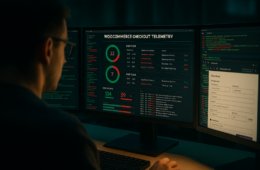
Summary: A mid-sized commerce site detected a spike in POST requests to an unfamiliar PHP file. Operators followed the checklist: they isolated traffic, rotated keys, and quarantined the file. A vetted backup was restored and sensitive endpoints re-signed. Root cause was a vulnerable third-party extension that allowed arbitrary file upload; removing the extension and tightening upload validation closed the vector.
Actions that mattered: fast isolation to preserve forensics, credential rotation to prevent lateral use, and careful restoration from a known-good backup. The team then implemented layered controls from this guide and used guidance from the Layered Defense Teardown to protect checkout flows going forward.
Implementation roadmap: quick wins vs deep fixes
Plan a 90-day roadmap with milestones that separate immediate risk reduction from resilient controls.
Days 1–7 (quick wins)
Apply automated updates where safe, enforce MFA for all admins, remove unused plugins/themes, and increase log retention. These steps reduce immediate attack surface and improve visibility.
Weeks 2–6 (operational hardening)
Introduce file integrity monitoring, formalize least-privilege workflows, and install rate-limiting or IP blocklists at the web layer. Train on containment checklist and run a tabletop exercise.
Months 2–3 (deep fixes)
Move toward immutable deployments, test and validate backups, and integrate alerting into a central incident playbook. Revisit upstream supply chain and enforce stricter plugin approval policies; see the playbook on plugin exploit risk for operator-level controls: Why Other Plugins Aren’t Enough: Layered Defense Playbook.
Operational tips and realistic examples
Example: When a new PHP file appears in wp-content/uploads, cross-check the access logs for the creating IP and time, verify whether an admin was active at that time, and check whether any plugin updates were performed. If the file is immediately reachable and accepts POSTs, treat it as high-priority and follow the checklist.
Example: For credential stuffing, lock accounts after small thresholds, block offending IP ranges at the edge, and require one-time admin approvals for sensitive actions until the incident is closed. For a full operator blueprint on stopping credential attacks see: Fight Back: Operator Blueprint.
Where Hack Halt Inc. fits into this roadmap
Hack Halt Inc. provides the telemetry correlation, file integrity checks, and workflow automation to implement many of the controls in this guide quickly. To implement the controls in this article with product-driven automation, see pricing and get started here: Get Hack Halt — pricing.
Final checklist and next steps for IT generalists
Start by applying the quick wins, run a tabletop exercise with your team using the containment checklist above, and schedule deep fixes into your next maintenance window. Use internal resources to learn detailed tactics: Incident Walkthrough: Locking Down Admin Access and How WordPress Hacks Actually Happen are practical follow-ups.
FAQ
How quickly can I contain a web shell?
Containment can begin within minutes if you isolate the site, revoke affected credentials, and block suspicious IPs while preserving forensic data. Full eradication and validation typically take hours to days depending on complexity and available backups.
What is the minimum telemetry I need to detect web shells?
At minimum collect HTTP access logs, PHP error logs, file integrity alerts, and admin login events. Correlating these sources lets you spot anomalous uploads, unexpected POSTs to unknown PHP files, and sudden privilege escalations.
Can I harden without disrupting my customers?
Yes — prioritize low-impact quick wins like enforcing updates, limiting admin sessions, and adding rate limits before deeper changes like role changes or file system lockdowns. Communicate maintenance windows for intrusive tasks such as restoring from backups or applying kernel-level protections.
When should I call in external help?
Engage outside expertise if you lack preserved forensics, if attackers maintain persistence after remediation, or if the site supports payments and customer data is at risk. Outside teams can validate eradication and help restore trust.