Brute-force and credential stuffing attacks are the workhorses of mass account takeover attempts against WooCommerce stores. As an eCommerce manager you don’t need theories — you need to know the operational mistakes that make these attacks succeed, and the precise corrective actions your team must implement now to protect payment and customer data. This article tears down common failures, gives tactical fixes you can apply today, and shows how to instrument detection and response so attacks stop before they hit checkout.
- Why brute-force and credential stuffing matter for WooCommerce
- How do brute-force and credential stuffing attacks break into WooCommerce sites?
- Common operator mistakes — a tactical teardown
- Tactical corrective actions (operator-focused fixes)
- Monitoring, containment, and recovery — operator runbook
- Incident mini-case study: Fast containment stopped payment fraud
- How to implement these controls with Hack Halt Inc.?
- Next steps for operators
- Further operator resources
- Frequently Asked Questions
Why brute-force and credential stuffing matter for WooCommerce
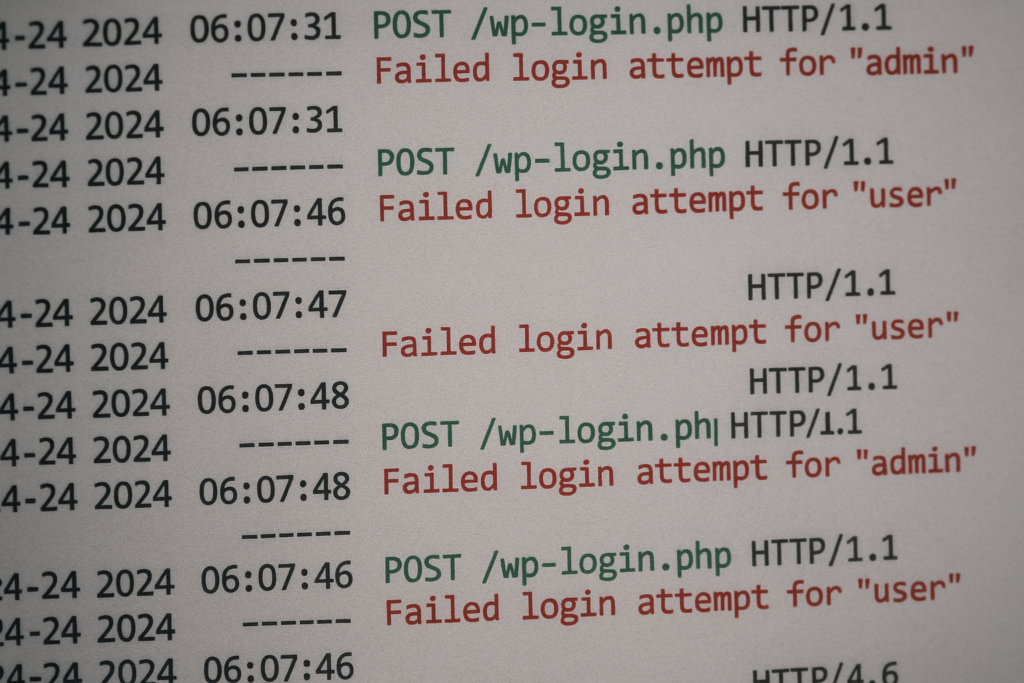
Server log snippet with repeated failed login attempts highlighted
Credential stuffing uses leaked username/password pairs from other breaches; brute-force tries many passwords until one works. For stores running WooCommerce, a single successful login can expose payment tools, saved billing profiles, and customer PII. Attackers target stores because even low success rates scale into real fraud when automated across hundreds of sites.
Why automated attacks succeed at scale
Automation allows attackers to test millions of credentials cheaply. Gaps like permissive lockout policies, unmonitored endpoint traffic, and credentials reused across sites turn those automated attempts into account takeovers.
What attackers look for in WooCommerce installs
They look for writable plugins, exposed admin endpoints, REST or XML-RPC access, and accounts with payment capabilities. Any account with order-refund or payment method privileges becomes a high-value target.
How intrusion leads to payment exposure
Once inside, attackers can place fraudulent orders, add payment tokens, or export customer data. Your detection and containment speed determines whether an intrusion is a nuisance or a major incident.
How do brute-force and credential stuffing attacks break into WooCommerce sites?

Operator reviewing an incident playbook beside warehouse order boxes
Most successful attacks rely on a chain of small mistakes: reused passwords, weak lockout rules, exposed login endpoints, and missing telemetry. Fixing any single item in that chain significantly reduces the chance of compromise.
Common operator mistakes — a tactical teardown
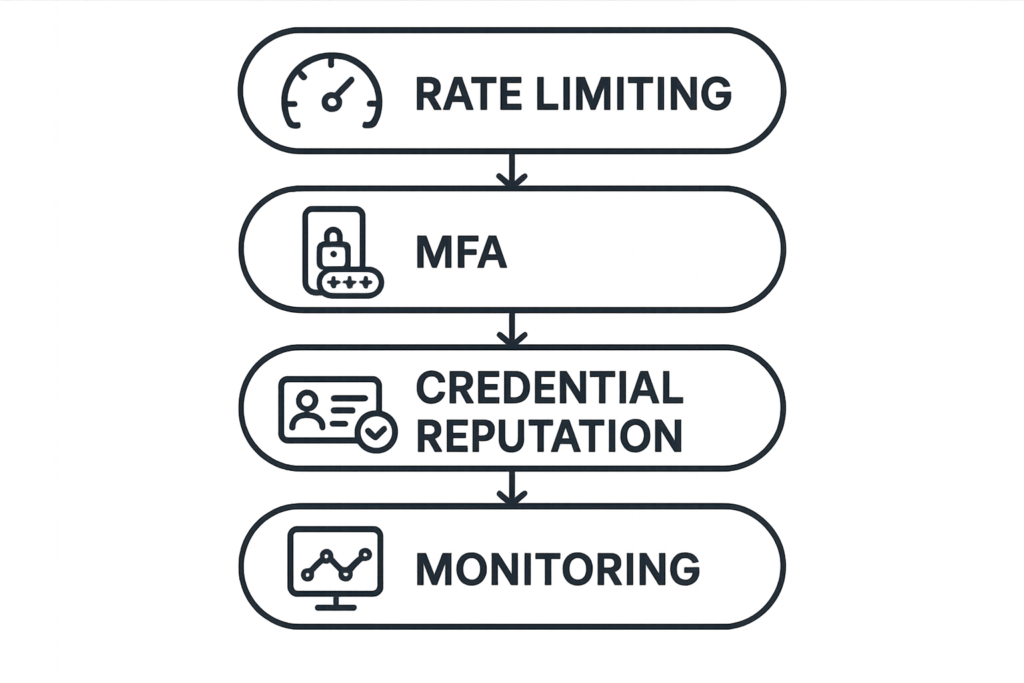
Layered defenses diagram: rate limiting, MFA, credential reputation, monitoring
Mistake 1: Treating login rate limits as optional
Many stores leave global rate limits unmanaged or rely on host defaults. That lets distributed bots spray attempts from many IPs. The corrective action: implement per-account and per-IP rate limits with progressive delays, not simple permanent bans. Configure thresholds that trigger alerts before full lockouts so you can differentiate a botnet from a legitimate spike.
Mistake 2: Allowing legacy endpoints (XML-RPC/REST) unrestricted access
XML-RPC and some REST endpoints are convenient for integrations but are favorite attack vectors. Audit which endpoints your store truly needs and explicitly disable or restrict them. Use authenticated tokens bound to specific IPs or services where possible.
Mistake 3: Weak or reused administrative and staff credentials
Shared service accounts and repeated passwords across third-party services make lateral movement trivial. Enforce unique credentials, rotate service keys, and restrict who can export orders or change payment settings.
Mistake 4: No credential reputation or abuse intelligence
Operators often lack tooling to flag known-bad credential lists. Without credential reputation checks, an attacker testing leaked pairs will waste less time and succeed more often. Integrate breach-aware credential checks into login flows and block known compromised credentials.
Tactical corrective actions (operator-focused fixes)
Enforce layered login defenses
Combine per-account lockouts, IP throttling, progressive backoff and CAPTCHA challenges at higher thresholds. Implement progressive friction: slow the response time slightly on suspicious attempts to make automation expensive while keeping legitimate user impact low.
Apply least privilege to every account
Audit user roles monthly; remove or downgrade accounts that don’t require order refunds or payment method management. Use short-lived service accounts for integrations and revoke keys immediately when not in use.
Instrument endpoints and monitor telemetry
Track failed login counts per account and per IP, spikes of POSTs to /wp-login.php, REST route abuse, and patterns of low-success, high-volume attempts. Feed these signals into alerts and automatic containment actions. For practical guidance on turning noisy logs into actions, see our Playbook: Turn Noisy WordPress Security Telemetry into Concrete Remediation Actions.
Use credential hygiene and recovery hardening
Block commonly leaked passwords, enforce strong password rules, and require re-authentication for sensitive actions like refunds or changing payment methods. When an account shows suspicious activity, require a password reset and revalidation of recent orders.
Monitoring, containment, and recovery — operator runbook
Detect: Key signals to watch
Early signals: rapid failed-login clusters across accounts, increased lockouts, and concurrent failed payments. Correlate these with geographic anomalies and user-agent patterns to reduce false positives.
Contain: Immediate steps when you see an attack
Throttle and block the offending IP ranges, enforce temporary password resets for targeted accounts, and disable payment actions until you validate account holders. Document every containment action in your incident log for post-incident review.
Recover: Post-incident actions
Rotate API keys, reissue service credentials, review admin role changes, and audit recent plugin updates for suspicious modifications. Communicate with affected customers and track remediation until cleanup is validated.
Where to get playbooks and operator blueprints
For a step-by-step operational playbook focused specifically on stopping automated abuse at checkout and high-value content, consult Operator Blueprint: Defend High-Value Content & Checkout Flows from Automated Abuse and the complementary Operator Blueprint: Stop Automated Abuse on High-Value Content and Checkout Flows.
Incident mini-case study: Fast containment stopped payment fraud
A mid-market store noticed a spike in failed logins followed by a small number of fraudulent orders. The ops team immediately blocked the originating CIDR, enforced a password reset for accounts with recent activity, and suspended refunds for 24 hours while validating transactions. Because role audits and least-privilege policies were already in place, attackers could not escalate to payment-token use. The team then used the telemetry playbook to tune thresholds and prevented repeat attempts. This containment prevented financial exposure and allowed the team to notify affected customers with clear remediation steps.
How to implement these controls with Hack Halt Inc.?
Hack Halt Inc. provides focused controls for rate limiting, credential reputation checks, and integrated telemetry tuned for WooCommerce environments. Use the platform to implement progressive lockouts, breach-credential blocking, and automated containment policies quickly; see the documentation for configuration details at Hack Halt documentation. When you need a fast way to convert the tactical fixes above into enforced controls, start with a plan and deploy through Hack Halt Inc. to reduce the time between detection and containment.
Next steps for operators
Start with an audit: list all admin and service accounts, identify enabled endpoints, and map payment privileges. Then prioritize fixes that break the attack chain: enforce least privilege, enable credential reputation checks, and instrument telemetry so you can detect and block automated attacks quickly. For more on admin mistakes specific to WooCommerce, read our teardown Admin Privilege Mistakes eCommerce Managers Make — A Tactical Teardown to Protect WooCommerce Payments.
Further operator resources
If you want a focused playbook specifically for brute-force and credential stuffing, see the Battle-Tested Playbook: Stop Brute-Force & Credential Stuffing on Your WordPress Site. To reduce incident blast radius and prepare for rapid recovery, consult the Why Other Plugins Aren’t Enough series and our layered response guidance in Layered Response Blueprint: Stop WordPress Malware & Web Shells Fast.
Frequently Asked Questions
How do I prioritize fixes for a busy eCommerce roadmap?
Prioritize controls that interrupt the attack chain fastest: unique passwords and MFA for admins, rate limiting and credential reputation checks on logins, then endpoint hardening for XML-RPC/REST. Those three deliver the biggest risk reduction for minimal operational cost.
Can host-level protections replace store-level defenses?
Host-level protections help but they’re not a substitute. Attackers adapt and will target application-level endpoints and accounts. Implement host and application controls together and centralize alerting so you can act quickly on signals from either side.
What about false positives and customer friction?
Tune thresholds and use progressive friction to reduce customer impact. Start with monitoring-only mode, review flagged events, then enable automated blocks. Use CAPTCHA and progressive delays before forcing password resets to preserve legitimate conversions.
Where should I look for more detailed operator blueprints?
For operational playbooks that map directly to the fixes in this article, review our operator and telemetry playbooks linked above, and check the documentation at https://hackhalt.com/documentation/ for configuration examples tailored to WooCommerce stores.