As an agency operator managing multiple client WordPress installations, the admin area and privileged workflows are your single biggest risk surface. This article tears down 12 frequent mistakes I see across client estates, explains why each error matters, and gives step-by-step corrective actions you can implement immediately. Read this as an operator checklist and playbook: tactical, prescriptive, and aimed at reducing blast radius when things go wrong.
Why hardening admin access matters for agencies
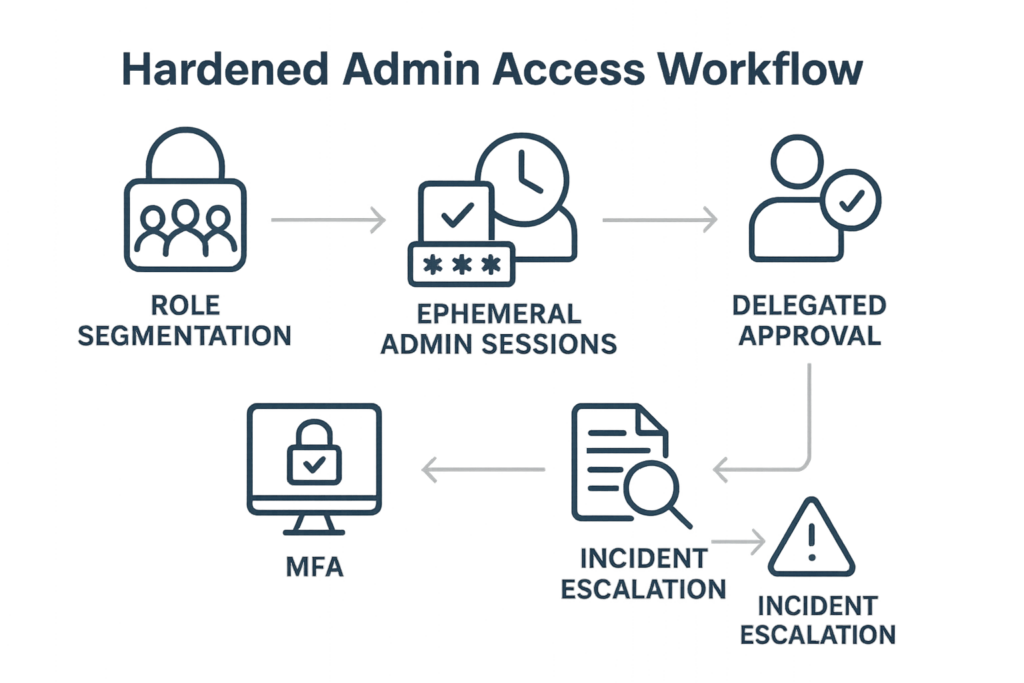
Infographic: hardened admin access workflow showing role segmentation, MFA, ephemeral sessions, and audit trails.
When one admin account is compromised on a client site, attackers can pivot, deploy persistent backdoors, or mass-target other clients. Agencies amplify risk because you often hold umbrella access, automation keys, or maintenance accounts. Hardening admin access shrinks the blast radius and makes detection and recovery much faster. Start with the fail-safe principle: assume credentials will leak and design for containment.
Mistake 1 — Shared admin accounts and undocumented credentials
Problem: Teams use a single admin user or share credentials via Slack, ticket notes, or spreadsheets. Consequence: lost accountability and a single compromise that breaks multiple services.
Corrective actions
- Create unique admin accounts for each human and automation principle. Where service accounts are needed, give them descriptive names and an owner.
- Remove passwords from shared places. Use an enterprise password manager integrated with your identity provider; audit access to every vault entry monthly.
- Implement short-lived, role-scoped credentials for automated tasks where possible. If you run automation, rotate keys on a schedule and force re-authentication for elevated ops.
Mistake 2 — Excessive privilege by default
Problem: All new users are granted admin or editor rights “to save time.” Consequence: A compromised low-risk user becomes a high-impact attacker.
Corrective actions
- Adopt least privilege: map out tasks and create custom roles that limit capabilities to what’s required.
- Use role review cycles: quarterly reviews to downgrade stale privileges and close gaps introduced during incident responses or rush jobs.
Mistake 3 — Weak or inconsistent MFA usage
Problem: MFA is inconsistently enforced—some clients have it, others don’t; service accounts bypass it. Consequence: Credential stuffing and phishing easily succeed.
Corrective actions
- Mandate MFA for every admin-level account, including contractor and service accounts that support elevated tasks.
- Prefer hardware-backed or app-based MFA and avoid SMS where feasible. If accessibility is a concern, bootstrap a recovery process that still requires multi-step verification and approval from two distinct owners.
Mistake 4 — No segregation of workflows for emergency access
Problem: Emergency access uses the same credentials and processes as normal ops. Consequence: Recovery paths are compromised during an incident, prolonging downtime.
Corrective actions
- Implement a documented break-glass procedure: separate emergency accounts, pre-approved by client leadership, with multi-person activation and timed expiry.
- Record every use of emergency access in an immutable audit trail and review it during post-incident meetings.
Mistake 5 — No audit trail and poor logging of admin actions
Problem: Admin activity is invisible; no consistent logging for changes, plugin installs, or credential resets. Consequence: Slow or impossible root cause analysis.
Corrective actions
- Enable admin-action logging at the site level and ship logs centrally for retention and correlation. Regularly spot-check critical changes rather than hoping for alerts alone.
- Define log retention and access controls: logs should be immutable and only writable by your logging pipeline.
Mistake 6 — No privileged session control (ephemeral sessions)
Problem: Admin sessions stay active indefinitely; sessions aren’t revoked on role change or departure. Consequence: Old tokens or cookies become an attack vector.
Corrective actions
- Enforce short session lifetimes for admin-level roles and require re-authentication before executing sensitive operations.
- On offboarding or role changes, revoke all active sessions and rotate any relevant keys immediately.
Checklist: Tactical steps to harden admin access (do this now)
Use this checklist as a sprint plan across your client estate. Treat each bullet as an actionable ticket with an owner and deadline.
- Inventory: enumerate every admin and service account across clients (owner, last use, privilege level).
- Unique accounts: eliminate shared logins; create accounts for individuals and label service accounts.
- Least privilege: create role templates for common agency tasks (content editor, dev deploy, billing) and apply them.
- MFA enforcement: require MFA for all privileged users; record exceptions and remediate within 14 days.
- Session controls: set admin session expiry to 15–60 minutes of inactivity and require re-auth for high-risk actions.
- Emergency access: implement break-glass flow with multi-approver activation and timestamped expiry.
- Audit logs: centralize logs, keep 90+ days for admins, and schedule weekly checks for suspicious patterns.
- Credential rotation: rotate service passwords and API keys quarterly or on role change.
- Test recovery: run an annual tabletop for an admin-compromise incident and refine playbooks.
Mini case study: How negligent admin access delayed recovery for a retail client
Scenario: One retail client experienced an admin takeover after a contractor’s shared account was phished. The attacker installed a backdoor and locked out legitimate admins. Two problems magnified the outage: undocumented emergency credentials and no immutable logs. Recovery took 48 hours because the team had to rebuild trust in admin accounts, rotate all credentials manually, and probe backups for integrity.
Lessons and fixes applied:
- Replaced shared accounts with unique identities and introduced role-based access templates.
- Introduced a break-glass account with two-person activation and a 2-hour expiry window.
- Centralized logs and retained immutable copies; the next incident was contained in under 4 hours.
Operational playbook snippets (real commands and admin actions)
Below are the kinds of step-by-step actions you should document per client. Adapt these to your tooling and change-control process.
- Immediate containment: Disable compromised account, revoke sessions, rotate any exposed keys, and block IPs where appropriate.
- Forensic snapshot: Export logs for the previous 7 days and snapshot the site file system and database for offline analysis.
- Recovery: Restore to a known-good snapshot if integrity cannot be verified, then rotate all privileged credentials before re-enabling access.
Where to start with limited time
If you can only do two things this week across your client portfolio, do the following:
- Enforce MFA for all admin-level accounts everywhere.
- Create and apply least-privilege role templates for your most common agency tasks.
If you need implementation templates and centralized workflows to scale this work, consider using a managed solution that integrates inventory, session controls, and audit trails to remove manual overhead. Hack Halt Inc. provides a way to implement these controls across clients quickly and consistently: Hack Halt Inc.
Related reading and templates
For deeper playbooks and a checklist that complements this teardown, review the agency-focused guides and toolboxes available on our site:
- Stop Brute-Force & Credential Stuffing: A Battle-Tested WordPress Hardening Playbook — practical rules to reduce account takeover risk.
- Battle-Tested WordPress Security Checklist: Minimize Incident Blast Radius with Monitoring and Recovery Playbooks — runbook templates for triage and restoration.
- Documentation — step-by-step configuration examples you can adapt for client templates.
FAQ
Q1: Can I use a single identity provider for multiple clients safely?
A1: Yes, if you isolate client tenants and enforce strict role mapping per tenant. Never reuse the same admin role across multiple clients without scoped policies and tenant separation. If your IdP supports conditional access and per-tenant policies, use them to enforce MFA and session controls.
Q2: What’s an acceptable session timeout for admin accounts?
A2: For interactive admin sessions, 15–60 minutes of inactivity is reasonable depending on the task. For highly sensitive operations (site restores, core file edits), require re-authentication for each action regardless of idle timeout.
Q3: How often should I rotate service account keys and passwords?
A3: Rotate service account keys at least quarterly, or immediately on role change or suspected exposure. Short-lived credentials are preferable; where not possible, make rotation a mandatory change-control item.
Q4: What’s the minimum logging I should capture for admin workflows?
A4: Capture identity, timestamp, action type (user creation, role change, plugin install, password reset), source IP, and request identifiers. Store logs in a central, write-once system and retain at least 90 days for admin-level events.
Hardening admin access is non-negotiable for agencies. Treat this teardown as the start of a disciplined program: inventory, remove shared secrets, enforce least privilege and MFA, control sessions, and centralize audit trails. Follow the checklist, run the tabletop, and bake the steps into onboarding and offboarding. For agencies that want a turnkey route to implement consistent controls and reduce operational overhead, Hack Halt Inc. offers managed workflows and templates to enforce these policies across client estates.