As an agency operator running dozens of WordPress installs, you’re the last line of defense when automated abuse starts targeting gated content or checkout flows. This blueprint gives you a pragmatic, repeatable playbook: how to detect abuse quickly, apply graduated mitigations that avoid collateral damage, and recover client trust with minimal downtime.
- How do I stop automated abuse on high-value content and checkout flows?
- 1) Detect: instrument the right telemetry
- 2) Triage: rapid impact assessment
- 3) Contain: graduated mitigations to avoid breaking legitimate users
- Actionable checklist: immediate steps to run now
- 4) Remediate: cleaner, safer restores
- 5) Recover: validate and restore confidence
- 6) Lessons learned: convert findings into repeatable playbooks
- How does Hack Halt fit into this blueprint?
- 7) Fleet-level hardening: prevent recurrence across clients
- 8) Realistic examples — three short operator scenarios
- Operator Notes — practical warnings and mistakes to avoid
- Final FAQ
How do I stop automated abuse on high-value content and checkout flows?
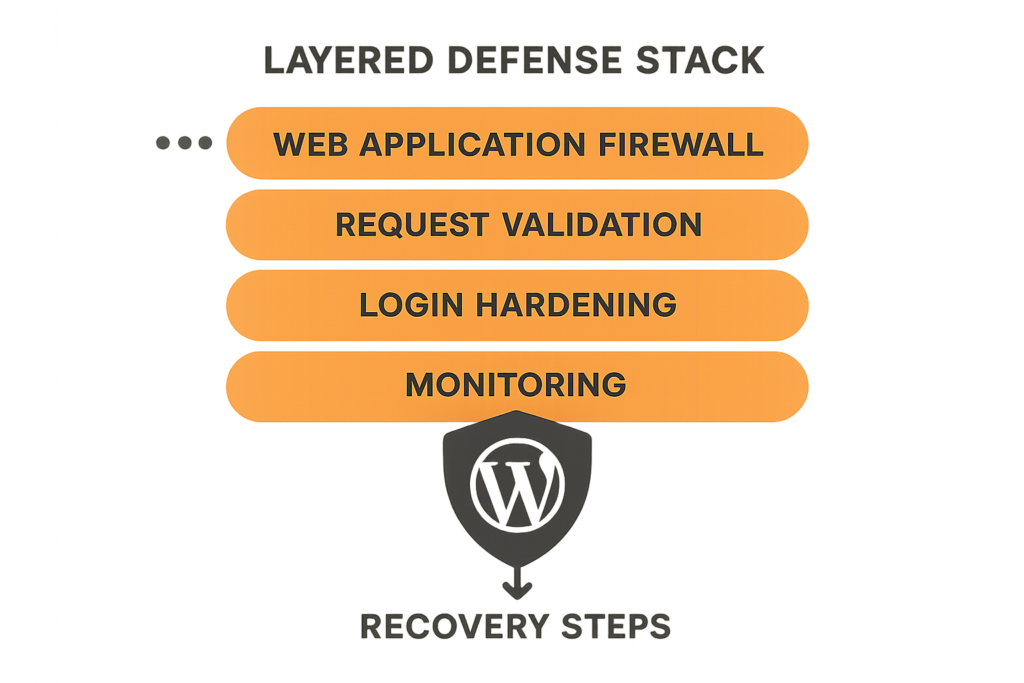
Layered defense stack diagram for WordPress
Start with rapid detection and graduated containment: collect request-level telemetry, enforce challenge-based throttles for anomalous sessions, and preserve logs before imposing broad IP blocks. Then run a short remediation loop—patch, rotate credentials, validate backups—and harden controls so the same vector can’t be reused.
1) Detect: instrument the right telemetry
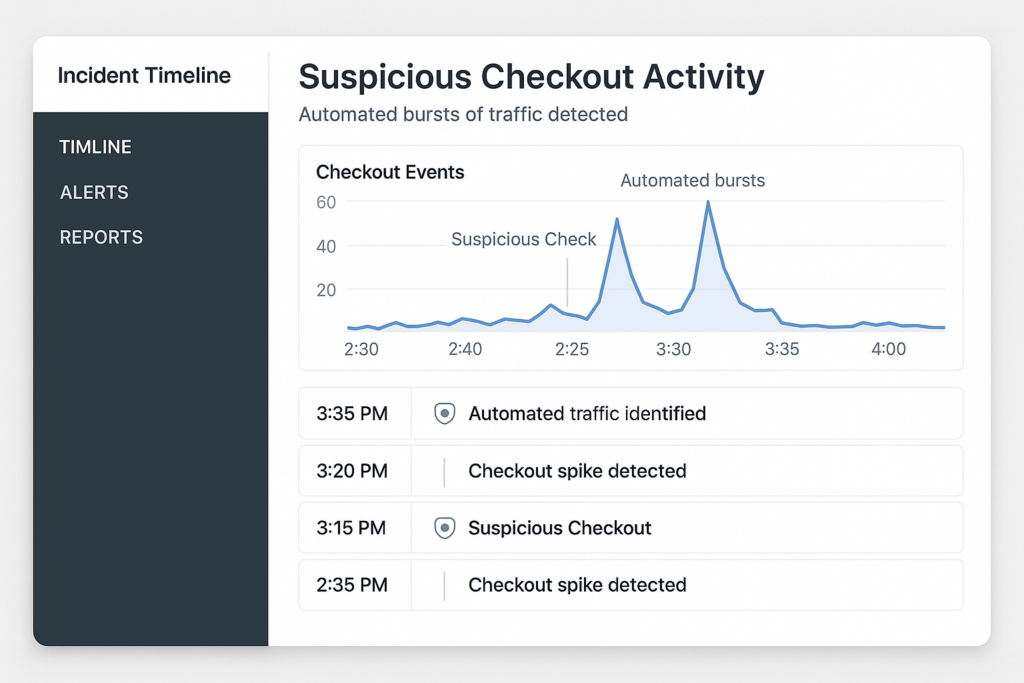
Incident timeline dashboard showing suspicious checkout bursts
You can’t stop what you can’t see. Instrument request-level telemetry for all high-value endpoints—login pages, account APIs, paywalls, cart and checkout endpoints. Capture headers, user agent, cookies or session IDs, request bodies or hashes, and server-side events tied to user IDs or carts.
Baseline normal behavior
Measure normal request rates per endpoint and per account during business hours vs off-hours so your alerts target anomalies rather than routine traffic spikes. Keep per-client baselines; fleet-level averages will mask tenant-specific patterns.
Signal types to collect
Collect IP and ASN, user agent, device fingerprint, geolocation, request rate, cart modification frequency, and error rates. These signals let you distinguish scraping and credential stuffing from legitimate high-volume events.
Where to store telemetry
Send telemetry to a centralized, searchable store with at least 30 days retention for incident investigations. If a mitigations platform or dashboard supports tag-based filters, tag events by client and endpoint for faster triage.
2) Triage: rapid impact assessment
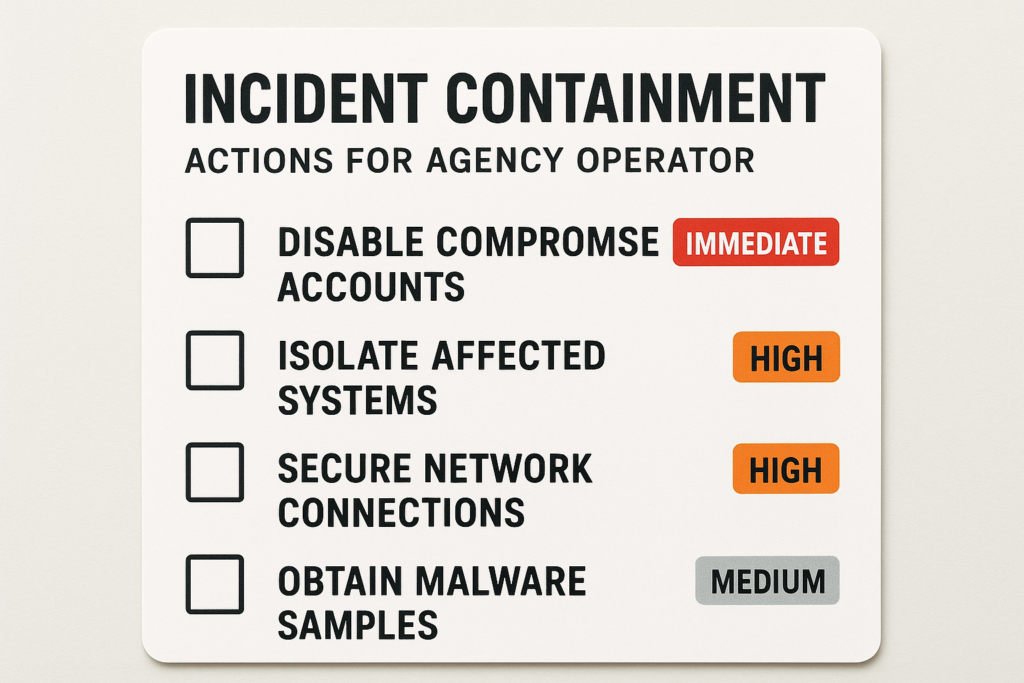
Incident containment checklist card for agency operators
Label the incident so your response matches risk: is it content scraping, checkout abuse (fake orders), or credential stuffing? Determine whether payment data or PII is at risk and whether a live checkout is being abused to test stolen cards.
Quick triage checklist
- Is the impact isolated to one client or multiple tenants?
- Which endpoints show anomalous activity (cart, checkout, APIs)?
- Is there a spike in failed payments, chargebacks, or new account creations?
3) Contain: graduated mitigations to avoid breaking legitimate users
Containment should be layered and reversible. Start with low-friction interventions and escalate only when abuse persists.
Tiered response actions
- Step 1 — Soft challenge: Add CAPTCHA or JavaScript challenge to the targeted endpoint for suspicious sessions.
- Step 2 — Per-account throttles: Limit checkout attempts per account or per payment method to stop rapid abuse of a single account.
- Step 3 — Per-IP rate limits: Block or throttle IPs showing repeated abuse after challenge failures.
Actionable checklist: immediate steps to run now
- Preserve forensic data: snapshot web server logs, plugin logs, and recent database transactions.
- Enable request-level trace for affected endpoints for at least 48–72 hours.
- Apply a challenge (CAPTCHA or JavaScript challenge) on checkout and gated content for suspicious sessions.
- Throttle suspicious sessions per-account and per-IP to 1/10 of normal rate for a short window.
- Notify payments/operations teams to monitor for chargebacks or irregular settlements.
- If compromise is confirmed, rotate API keys and admin credentials and isolate affected accounts.
4) Remediate: cleaner, safer restores
After containment, move to remediation with an emphasis on preserving evidence and minimizing re-introduction of malicious code.
Steps for a safe remediation
- Compare current files to verified baselines and replace altered files from trusted backups.
- Update WordPress core, themes, and plugins immediately if you detect an exploit vector.
- Rotate any credentials that might have been exposed, including service accounts and API keys.
5) Recover: validate and restore confidence
Validate the checkout flow end-to-end in a staging mirror, then monitor the production environment closely as mitigations are relaxed. Use canary releases for mitigation rollback to reduce risk.
6) Lessons learned: convert findings into repeatable playbooks
Document root cause, detection gaps, and the exact sequence of containment actions that worked. Convert those steps into automation so your team can trigger them reliably across clients.
Automate and codify
Turn your manual containment steps into a scripted runbook or orchestration policy. For example: when checkout bursts exceed the client baseline by X, automatically apply a challenge and add per-account throttling. See the Operator Blueprint: Stop Automated Abuse on High-Value Content and Checkout Flows for a deeper workflow you can adapt.
How does Hack Halt fit into this blueprint?
Hack Halt Inc. provides controls and orchestration that let you implement the graduated mitigations and centralized telemetry described above; use the product to apply challenge pages, throttle policies, and audit trails across your fleet quickly. Explore plans to deploy these controls consistently at scale: Hack Halt pricing.
7) Fleet-level hardening: prevent recurrence across clients
Apply uniform protections and monitoring rules across all client sites so an attacker can’t pivot from one tenant to others. Centralize alerts, normalize baselines per tenant, and run automated checks after plugin updates.
Useful internal references
Operationalize monitoring and recovery by integrating these playbooks into your agency ops: Playbook: Turn Noisy WordPress Security Telemetry into Concrete Remediation Actions, and if you need a focused response for malware and web shell incidents, consult the Layered Response Blueprint: Stop WordPress Malware & Web Shells Fast. For documentation on specific settings and how Hack Halt implements these protections, see the official Hack Halt documentation.
8) Realistic examples — three short operator scenarios
Example: content scraper hitting paywall
Detect: sudden high-rate GETs on paywalled endpoints from a small ASN. Contain: challenge requests and throttle by session fingerprint. Remediate: patch the API that leaked an unauthenticated cursor and rotate any shared API keys.
Example: automated fake orders on checkout
Detect: many checkout attempts tied to new accounts with identical headers and fast step times. Contain: per-account checkout limit and CAPTCHA on payment submission. Remediate: review payment logs, notify the merchant, and block residual card-testing IPs.
Example: credential stuffing against vendor admin
Detect: repeated failed logins from diverse IPs, same password patterns. Contain: enforce account lockouts and MFA for admin roles, rotate admin credentials, and review plugin privileges.
Operator Notes — practical warnings and mistakes to avoid
- Avoid blanket IP blocks unless you’ve preserved logs; blocks impede forensic analysis and can break legitimate users behind NAT.
- Don’t let mitigation changes go undocumented; include the person who applied the change and the reason in the incident record.
- Test CAPTCHA and JS challenges on representative mobile devices to prevent usability regressions for real customers.
Final FAQ
How quickly should I contain an automated abuse incident?
Containment should start within minutes of confirmation. Block offending IP ranges or user agents, enforce stricter rate limits, and temporarily disable affected endpoints while you collect forensic data; move to full remediation only after you’ve preserved logs and validated backups.
Will blocking traffic break legitimate users on mobile or behind NAT?
Aggressive blocks can impact legitimate users, so prefer graduated mitigations: enforce CAPTCHA or challenge pages, apply per-account throttling, escalate to IP blocks only for repeat offenders, and monitor for false positives during the first 24–72 hours.
What’s the minimum telemetry I should collect to investigate checkout abuse?
Capture request timestamps, full request headers, user agent, session or user ID, payload hashes, and server-side events (cart update, checkout complete). Correlate these with web server logs and WAF events; store them in a central index for at least 30 days to enable investigation.
Done right, this blueprint becomes an operable standard for every client you manage. Start by codifying the detection signals, then automate the containment rules so you can move from firefighting to predictable, repeatable security operations. If you want a turnkey way to deploy these controls and orchestration across your client fleet, consider using Hack Halt Inc. as the single place to implement the policies and runbooks in this article.