Plugins extend WordPress but they’re not a safety net. For IT generalists who own uptime, patching, and incident response, the priority is reducing the blast radius when things go wrong: detect faster, contain smarter, and restore safely. This roadmap gives quick wins you can implement immediately and deeper architecture fixes to adopt over the next quarter. The goal: reduce incident blast radius so a single plugin exploit doesn’t become a full-site outage or data breach.
- Why aren’t other plugins enough?
- The blast radius problem explained
- Quick wins to reduce blast radius (implement this week)
- Deep fixes and architecture changes (quarter roadmap)
- Monitoring and recovery playbooks
- Incident mini-case study: plugin exploit contained in 45 minutes
- How to implement this with your team and tools
- Actionable checklist: shrink blast radius now
- Conclusion: measure what matters
- FAQ
Why aren’t other plugins enough?
Plugins are tools that address specific risks, not a platform-wide containment and recovery strategy. Many security plugins focus on prevention or alerting, but few provide the coordination between detection, isolation, and recovery that prevents lateral spread. You still need monitoring, isolation, credential hygiene, and rehearsed playbooks to limit damage when a plugin is exploited. See our operator blueprint on how WordPress hacks actually happen for context: How WordPress Hacks Actually Happen.
The blast radius problem explained
When a plugin is compromised, the attacker rarely needs to escalate across an entire architecture if the environment trusts the plugin too much. Blast radius is the set of components and data that can be affected by one compromise: user accounts, uploads, payment flows, backups, or even the database. If those components lack segmentation, a single exploit can become a full-site outage or data breach.
Quick wins to reduce blast radius (implement this week)
Start with the controls that require low operational cost but yield big containment benefits. Below each control we list concrete steps you can perform in the next 24–72 hours.
1. File integrity monitoring and alerting — steps
- Enable file monitoring for core, themes, and plugins. If your host provides FIM, turn it on; otherwise install a lightweight agent.
- Configure alerts to go to a single incident channel (email + Slack/MS Teams). Deduplicate noisy alerts by severity.
- Implementation checklist:
- Scan baseline now, save checksums for quick diffing.
- Set alert thresholds for new/modified PHP files in uploads or wp-content.
- Test by making a benign change and confirm alert flow and runbook linkage.
2. Isolate high-risk subsystems — steps & examples
Examples of quick isolation actions that materially reduce blast radius:
- Create a separate database user for reporting with read-only privileges.
- Restrict the uploads directory so PHP execution is blocked (webserver config or .htaccess).
- Move payment flows off the same app server — use a dedicated service account and scoped API keys.
Concrete commands and notes:
- To block PHP in uploads (Apache .htaccess): create a rule to deny PHP execution in /wp-content/uploads.
- To create a read-only DB user, run the DB grant statements your platform expects and update reporting connections.
3. Lock down admin workflows — immediate actions
Enforce MFA for all admin accounts, revoke shared logins, and convert perpetual admin accounts to short-lived privileges. Use these steps:
- Audit admin users: remove or convert any unused admins.
- Create a policy: new admins are time-bound and reviewed weekly.
- Automate revocation for contractors. Where possible, use SSO with just-in-time provisioning.
For deeper tactical hardening guidance consult Hardening Admin Access and Privileged Workflows and Admin Access Mistakes: Tactical Fixes.
4. Quick backup validation (don’t skip this)
Many teams have backups but never verify them. Do a quick restore to a sandbox this week to ensure backups are not poisoned and contain usable artifacts. Checklist:
- Restore latest full backup to a staging URL.
- Validate uploads, database, and payment configuration are separated.
- Document time-to-restore with steps and owners.
Deep fixes and architecture changes (quarter roadmap)
These are higher-effort but permanently shrink blast radius and speed recovery. Plan them, assign owners, and track them as a project with milestones.
1. Principle of least privilege for integrations — implementation steps
- Inventory all service accounts, plugin API keys, OAuth clients, and integration users.
- Map each credential to the minimum required scope and create replacement scoped credentials.
- Automate rotation: use secrets management or platform-native rotation for every high-privilege credential.
See operator-focused guidance in Minimize WooCommerce Blast Radius when payments are in scope.
2. Immutable or easily rollbackable deployments — recommended patterns
- Build artifacts (zip or container) for every theme/plugin release and tag in a version control system.
- Use automation to deploy artifacts and provide a single-click rollback to the last-known-good artifact.
- Test rollback monthly and document the exact restore command or UI sequence.
Monitoring and recovery playbooks
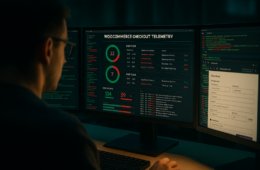
Monitoring without a playbook leaves teams guessing. Put clear, short runbooks next to each alert: what to check, how to contain, and who owns the ticket. Below are two concise playbook templates you can copy into your incident tool.
Playbook template: Unexpected PHP in uploads
- Detection: FIM alert for new/modified PHP in /wp-content/uploads.
- Immediate containment (0–10 min):
- Disable web execution in uploads (block via webserver or firewall).
- Move current uploads snapshot to isolated storage (mark read-only).
- Disable suspect plugin(s): wp plugin deactivate plugin-slug OR via host panel.
- Follow-up (10–60 min):
- Rotate any credentials the plugin used.
- Restore uploads from last-good backup to a read-only storefront if necessary.
- Escalation: notify legal/PCI lead if payments or customer data may have been touched.
Playbook template: New admin user created
- Detection: Audit log shows creation of a new admin account.
- Immediate containment:
- Disable the account and force password resets for other admins.
- Verify MFA status for all admins.
- Forensics:
- Export access logs for the preceding 24 hours.
- Check plugin install events and recent file changes.
Automated containment primitives — examples
Automation reduces human error and MTTC. Concrete automation examples your team can build:
- Webhook: FIM alert ➜ call API to deactivate plugin via WP-CLI on a staging host or host control panel.
- Secrets manager: on-trigger rotate the impacted API key and push new key to dependent services.
- Network controls: block outbound connections from the PHP process user or add an IP block in the application firewall.
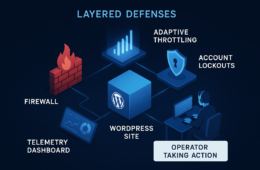
These patterns are also covered in our layered response work: Layered Response Blueprint and Fight Back: Layered Defense Against Malware & Web Shells.
Incident mini-case study: plugin exploit contained in 45 minutes
On a medium-traffic site, a plugin with an unauthenticated file upload flaw was exploited. File integrity monitoring alerted on new PHP in the uploads folder; the runbook instructed the operator to disable the plugin (wp plugin deactivate plugin-name), revoke the plugin-specific credential, and isolate the uploads directory. Because the team had an automated artifact-based rollback and a documented playbook, they contained the incident and restored a read-only storefront in 45 minutes while full remediation continued. The separate payment endpoint remained unaffected because it lived behind a scoped credential and separate service account. This scenario highlights how small architecture decisions and documented steps materially reduce incident impact.
How to implement this with your team and tools
Don’t try to overhaul everything at once. Run a prioritized backlog: quick wins first, then quarterly platform changes. Assign owners, set a test cadence, and run a quarterly tabletop to validate detection and recovery.
Roles and ownership — practical assignment
- Owner, Detection & Triage: first-responder who verifies alerts and triggers containment.
- Owner, Containment & Recovery: person with platform privileges to disable plugins and execute rollbacks.
- Owner, Forensics & Postmortem: documents root cause and updates playbooks.
- RACI: keep a one-page RACI with contact phone numbers for each incident type so the first responder can act without delays.
Testing and continuous improvement — cadence
Schedule monthly verification of automated rollbacks and quarterly full-scope drills. Use a simple rubric:
- Monthly: smoke-test rollback of the most recent artifact and validate backup restores.
- Quarterly: tabletop with simulated detection and full playbook execution — measure MTTD and MTTC.
- After any incident or drill: update playbooks within 72 hours with lessons learned.
Actionable checklist: shrink blast radius now
- Enable file integrity monitoring for core, themes, plugins.
- Segment payments, uploads, and backups from public-facing code.
- Enforce MFA and remove shared admin accounts.
- Implement scoped service credentials and automated rotation.
- Create and publish one-page recovery playbooks for top 3 incident types.
- Automate safe rollback for recent code or plugin changes and test monthly.
- Restore a backup to staging to validate it’s usable.
- Run a quarterly tabletop simulation and update your runbooks.
- Assign explicit owners for detection, containment, and forensics.
For operational templates and hardening details that map directly to the controls discussed here, consult the Hack Halt documentation, our Battle-Tested WordPress Security Checklist, and the Battle-Tested Playbook: Stop Brute-Force & Credential Stuffing for additional containment tactics. If you need specialized guidance for WooCommerce, review Minimize WooCommerce Blast Radius.
To start a trial or centralized rollout with your team, see our Register page or the Security Hub for quick resources.
Conclusion: measure what matters
Plugins will always be part of WordPress, but they are not a containment strategy. Focus on detection speed, containment actions, and repeatable recovery. Track MTTD and MTTC, automate safe rollbacks, and rehearse playbooks. Those steps reduce the number of assets affected per event and keep your business running while you remediate. In short: reduce incident blast radius by coupling monitoring with tested containment and recovery playbooks.
FAQ
Can monitoring alone stop a plugin exploit?
No. Monitoring lets you detect and limit damage but does not prevent the exploit. Combine detection with containment controls, fast rollback capability, credential hygiene, and a documented recovery playbook to reduce the blast radius.
How fast should a recovery playbook aim to restore service?
Aim for a fast, predictable recovery window that matches your uptime requirements: typically an initial containment and partial restore in under 60 minutes, and full recovery within a few hours for most sites. Prioritize safe partial restores (read-only or storefront-only) to keep critical functions available while full remediation continues.
What metrics indicate a reduced blast radius?
Track mean time to detect (MTTD), mean time to contain (MTTC), number of compromised endpoints, and percentage of traffic or transactions impacted. A shrinking blast radius shows up as faster MTTC and fewer affected components per incident.
Does this approach require replacing existing plugins?
Not necessarily. The roadmap focuses on layered controls around plugins — monitoring, isolation, credential controls, and recovery automation. Use existing plugins for features they do well, but don’t rely on them alone for containment and recovery.