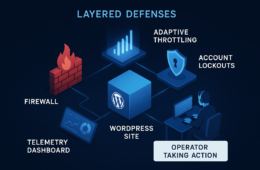
As an agency operator responsible for multiple WordPress installs, your priority is protecting what matters most: premium content and checkout flows that drive revenue. This blueprint walks you through concrete hardening controls, rapid detection and triage, and a checklist-driven incident response you can use across clients. I’ll guide you step-by-step with examples you can copy into client runbooks.
- Threat model: what automated abuse looks like for agencies
- How do you stop automated abuse on high-value content and checkout flows?
- Hardening controls to deploy (step-by-step)
- Detecting and triaging incidents quickly
- Incident response: contain, preserve, recover
- Actionable checklist: operational steps to protect a checkout flow
- Operational playbooks and automation
- How to bake this into agency operations
- FAQ
Threat model: what automated abuse looks like for agencies
Start by defining what ‘automated abuse’ means for each client. For a membership site it may be credential stuffing or content scraping; for an e-commerce client it’s checkout scraping, coupon abuse, or automated transactions. Map the most valuable endpoints, associated credentials, and third-party payment touch points so every mitigation targets real business risk.
Common automated vectors
Credential stuffing, headless browsers scraping paywalled content, form abuse, and automated checkout attempts each leave different fingerprints: rapid repeated requests, improbable behavioral patterns, or malformed user agents. Capture those signals in telemetry.
High-value targets to prioritize
Always treat these as high-priority: /checkout, /cart endpoints, membership content pages, download endpoints, and admin AJAX endpoints. Protect them with stricter controls than generic site pages.
Why agencies need standardized playbooks
When you manage many installs, inconsistent response causes downtime and client churn. Use a common playbook so junior operators can apply proven containment steps without bespoke guesswork. See the Turn Noisy WordPress Security Telemetry into Concrete Remediation Actions playbook for concrete telemetry-to-action patterns.
How do you stop automated abuse on high-value content and checkout flows?
Use a layered approach: immediate edge throttles and blocking, application-level behavioral checks, and rapid-response runbooks that snapshot and contain. These actions reduce economic incentive for attackers while preserving legitimate customer traffic.
Hardening controls to deploy (step-by-step)
Prioritize controls you can deploy quickly and that are reversible. For each client, start with non-destructive mitigations, measure impact, then tighten as needed.
1) Rate limiting and edge controls
Implement endpoint-specific rate limits on critical routes like /checkout, /wp-json, and download endpoints. Use progressive throttling: slow suspicious sessions first, then block persistent offenders. Example policy:
- Baseline: allow typical customers up to 10 requests/minute to /checkout with short burst to 30.
- Suspicion threshold: >5x baseline for 2 minutes => soft throttle (add 1s delay per request).
- Escalation: >10x baseline or repeated soft throttle => block for 1 hour and flag for review.
For details on matching telemetry to remedial actions, see the telemetry remediation playbook.
2) Session and cookie hardening
Enforce secure, HttpOnly cookies and originate sessions with short-lived tokens for checkout flows. Require revalidation for sensitive actions (e.g., require a fresh authentication step for payment changes).
Implementation steps:
- Set SameSite=Strict for admin and checkout cookies where possible; set HttpOnly and Secure flags site-wide.
- Shorten checkout session TTL (example: 10–15 minutes of inactivity) and rotate cart tokens on significant cart changes.
- Require a re-authentication step (password or OTP) for payment instrument changes or order edits above a monetary threshold.
3) Behavioral checks and bot challenges
Favor behavioral checks (mouse movement, timing patterns) and stepped challenges that escalate only when suspicion thresholds are met. Avoid broad CAPTCHA blocks that harm conversions—use targeted challenges on checkout or account endpoints.
Example stepped challenge flow:
- Low confidence: add subtle latency and fingerprint the session.
- Medium confidence: serve a one-question challenge or device-check and log response time.
- High confidence: present an interactive challenge (CAPTCHA) or deny checkout until reviewed.
Detecting and triaging incidents quickly
Detection is only useful if it maps to actions. Instrument event-level telemetry for request rates, failed authentication spikes, coupon code abuse, and unusual checkout patterns. Build alert rules you can trust.
Telemetry baselining
Establish normal ranges for key metrics (requests/minute to /checkout, failed login rate). Alerts that fire on deviations should reference historical baselines to limit noise.
Suggested baseline metrics to collect and thresholds to consider as starting examples:
- /checkout requests per minute per IP and per geo — alert if per-IP > 30 RPM or site-wide > 10x 24-hour median.
- Failed coupon attempts — alert if > 20/minute or coupon hit rate rises sharply.
- Failed login attempts per account — alert if > 10 in 5 minutes or simultaneous logins from multiple geos.
Prioritizing indicators
Use a simple prioritization rubric: confirmed abuse (automated checkout succeeded) is P1; high-confidence probes (rapid invalid checkout attempts) are P2; low-confidence anomalies are P3. Your containment differs for each tier.
Example triage play mapping:
- P1: snapshot, block, revoke API keys, and notify client/payment provider.
- P2: apply throttles, soft-challenge, gather forensic logs, continue monitoring.
- P3: increase sampling, enrich telemetry, and wait for corroborating signals before action.
Link telemetry to playbooks
Turn alerts into deterministic actions: throttle, block, snapshot, notify. The Battle-Tested WordPress Security Checklist helps ensure monitoring maps to recovery actions.
Incident response: contain, preserve, recover
When abuse is detected, follow a simple sequence so teams move consistently and speed matters more than perfection.
Containment steps
Apply targeted throttles or temporary blocks to offending IP ranges or rule sets. If the checkout is under attack, temporarily disable guest checkout, enforce strong anti-automation checks, and place a soft throttle on payment requests.
Immediate containment runbook (copy into client runbook):
- Confirm signal: validate spike using logs and metrics dashboards.
- Apply temporary containment: enable endpoint-specific throttle and block offending IPs/ranges.
- Disable high-risk features: guest checkout, account creation, or coupon redemption as needed.
- Snapshot artifacts: filesystem, database, web and application logs, and payment gateway logs.
- Notify stakeholders: internal ops, client primary contact, and payment provider if transactions were impacted.
Forensics and preservation
Immediately snapshot the site, collect logs, and preserve database exports before making destructive changes. Those artifacts are essential for root-cause analysis and client reporting.
Minimum forensic capture checklist:
- Web server access/error logs (time-range covering event).
- Application logs (payment plugin logs, WooCommerce order logs).
- Database export (orders, users, recent post changes).
- WP filesystem snapshot for new/modified files.
- Payment gateway transaction logs and API audit trails.
Recovery and rollback
After containment, validate site integrity, roll back unauthorized changes, rotate keys or payment credentials if exposed, and restore normal traffic policies. Use a staged rollback so you can re-enable controls incrementally.
Recovery steps:
- Validate order integrity: reconcile orders against payment provider logs, flag suspicious transactions for manual review.
- Rotate exposed keys and webhook secrets if they may have been captured.
- Reinstate normal policies gradually: remove temporary blocks for verified good IPs, lower throttles in stages.
- Run a post-incident review and update the runbook with lessons learned.
Actionable checklist: operational steps to protect a checkout flow
- Inventory high-value endpoints and document them in the client’s runbook.
- Apply endpoint-specific rate limits and progressive throttling for /checkout and /cart.
- Enable session hardening and require re-authentication for payment changes.
- Instrument telemetry for request metadata, user agent anomalies, and action-level events.
- Define triage tiers and mapped containment actions (throttle, block, isolate endpoint).
- Run a simulated abuse drill monthly and update the playbook based on lessons.
- On incident, snapshot systems, apply containment, and preserve logs for investigation.
- Train operators on escalation: who calls the client, who contacts the payment provider, and who performs forensics.
Operational playbooks and automation
Convert manual steps into runbook tasks and automated responses where possible. Use scripted containment actions for known-safe operations and ensure human review for destructive steps.
Automate safe responses
Automate reversible actions: apply temporary throttles, add short-lived firewall rules, and mark sessions for challenge. Keep final destructive actions manual.
Automation suggestions:
- Auto-throttle when /checkout RPM > 5x baseline for two minutes.
- Auto-challenge sessions flagged by behavioral fingerprinting but require human confirmation for blocks.
- Scripted snapshot generation (database + logs) triggered when a P1 alert fires.
Runbook examples and documentation
Store playbooks with clear decision trees. Reference detailed procedural docs; for controls that Hack Halt helps you implement, link to the product documentation so your operators can execute consistently: Hack Halt documentation.
Include links to complementary operator guides such as Stop Brute-Force & Credential Stuffing, Admin Access Hardening, and the various layered defense and recovery playbooks across your runbook library.
When to involve clients and payment providers
Escalate to the client for any suspected financial fraud or data exposure. If transactions were affected, notify payment providers and follow their fraud handling guidance while retaining forensic artifacts.
How to bake this into agency operations
Create a templated onboarding checklist for new clients that includes endpoint inventory, baseline telemetry configuration, and a scheduled abuse drill. Train junior operators with the exact containment steps and attach relevant links to your shared runbooks.
Implementation rollout (4-week sprint example):
- Week 1: Inventory endpoints, baseline telemetry, and deploy non-destructive throttles.
- Week 2: Deploy session hardening, behavioral checks on a canary client, and tune thresholds.
- Week 3: Automate safe responses, build runbook tasks, and integrate alerting channels.
- Week 4: Run simulated abuse drill, update playbooks, and train operators.
To implement these controls quickly across your client fleet, consider a single vendor approach for monitoring and recovery that integrates telemetry-to-remediation playbooks—start by evaluating Hack Halt Inc. as a way to automate detection and apply the playbooks described above: Get Hack Halt Inc. to implement these controls.
FAQ
How quickly should I contain automated abuse on a client checkout?
Containment should start within minutes of confirmed abnormal behavior — block offending IP ranges or rule sets, isolate affected payment endpoints, and throttle suspect sessions while you triage. The goal is to stop live transactions and credential stuffing without disrupting legitimate customers.
Can I rely on a single plugin to stop content scraping and checkout attacks?
No. Automated abuse is multi-vector and requires layered controls: edge rate limiting, application-level checks, robust telemetry, and recovery playbooks. Use integrated operational controls and runbooks rather than a single bolt-on plugin. See related operator roadmaps like How WordPress Hacks Actually Happen and the admin privilege teardown for eCommerce managers: Admin Privilege Mistakes — WooCommerce.
What is the first thing an agency operator should do after detecting abuse?
Begin containment: identify the affected endpoints, apply immediate throttles or access restrictions, snapshot the site and database for forensic needs, and escalate to your recovery playbook so you can restore normal operations once the abuse is mitigated. For a tactical layered containment strategy, consult the Layered Response Blueprint.
Further reading: review the Layered Defense and Layered Response Blueprint for complementary incident response patterns that work alongside the defenses in this article.
Remember: automated abuse WordPress operators face is an operational challenge as much as a technical one. Standardize telemetry, automate safe responses, and keep crisp runbooks so your team can move quickly and consistently across client portfolios.