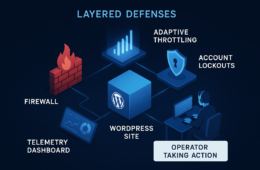
Plugins help. They scan, block obvious attacks, and add friction to credential stuffing — but for IT generalists responsible for uptime, patching, and incident response, plugins are a single prevention layer, not a full containment and recovery strategy. This roadmap focuses on short wins you can implement today and deeper fixes that harden detection, containment, and recovery so incidents have minimal business impact.
- Why aren’t plugins enough to reduce blast radius?
- Start with an asset and blast-radius inventory
- Monitoring is the multiplier: what to watch
- Containment playbook: immediate actions
- Containment: sample incident timeline (0–3 hours)
- Recovery playbook: safe, fast restore
- Actionable checklist: quick wins and deep fixes
- How do you wire monitoring into incident response?
- Mini-case study: contained plugin exploit without major downtime
- Integrate this roadmap with your existing tools
- Measuring blast radius and success metrics
- Communication and post-incident
- Where Hack Halt Inc. fits into this roadmap
- Next steps and metrics to track
- Final checklist before you leave this page
- FAQ
Why aren’t plugins enough to reduce blast radius?
Plugins are mostly prevention-focused and can miss sophisticated lateral movements, living-off-the-land techniques, and degraded backup integrity. Relying on them alone leaves you without reliable detection timelines, automated containment, or a tested recovery path — all critical to shrink blast radius and restore service fast. Plugins rarely provide end-to-end playbooks, integrated backup validation, or the operational runbook discipline needed when an incident occurs. See related operator-focused guidance in How WordPress Hacks Actually Happen for more on exploit lifecycle and risk-reduction tactics.
Start with an asset and blast-radius inventory
Quick wins begin with clarity. Map which WordPress components drive revenue, which plugins touch payments, and which admin accounts have cross-site privileges. Prioritize assets where compromise would cause the largest customer-facing or compliance impact.
Identify critical endpoints
List endpoints like checkout pages, API endpoints, REST routes, and SFTP/SSH access. Those are your immediate containment priorities during an incident. Example prioritized list:
- Payment checkout and webhook endpoints
- Customer-facing REST endpoints that read/write PII
- Admin ajax endpoints exposed to authenticated users
- SFTP/SSH endpoints and database management consoles
Tag high-impact plugins and integrations
Document every plugin that interacts with external systems (payment gateways, CRMs, shipping APIs). During an incident, you’ll need to quarantine these integrations quickly. Maintain an owner for each integration and the service-level rollback/disable step for each plugin so you can cut external connections without guesswork.
Monitoring is the multiplier: what to watch
Monitoring shifts your posture from reactive to proactive. Track file changes, unusual PHP process launches, spikes in POST requests, anomalous admin logins, and failed patch updates. Correlate these signals into a single incident stream so response triggers are reliable.
File integrity and unexpected change detection
Configure file change alerts for wp-config.php, plugin directories, theme files, mu-plugins, and uploads where executable files sometimes appear. Prefer checksumming (SHA256) and daily diffing versus simple mtime checks to reduce noise. Sample watchlist:
- /wp-config.php
- /wp-content/plugins/* (new files, unexpected extensions)
- /wp-content/themes/* (unexpected PHP additions)
- /wp-content/uploads/* (PHP in uploads)
Session and credential monitoring
Detect concurrent admin sessions, unfamiliar IP geographies for privileged users, and rapid role escalations. Make session invalidation a standard containment action. Track privileged actions (plugin install/activate, theme edits, user role changes) and map them to required approvals so unexpected changes trigger immediate review.
Implementation steps: practical monitoring wiring
- Deploy a file integrity monitor (FIM) and centralize alerts to your SIEM or operational hub.
- Ship webserver/access logs and PHP-FPM logs to a central store and enable parsing for POST spikes and abnormal status codes.
- Define thresholds: e.g., >10 POST requests/s to checkout, >5 failed admin logins/min from same IP, or any POST to REST routes from anonymous actors.
- Map each alert to a runbook entry with “who”, “what”, and “time-to-action”. Automate low-risk fixes (session revoke, maintenance mode toggle) with guardrails.
Containment playbook: immediate actions
Containment is about minimizing damage while preserving forensic value. Your playbook should list precise, ordered actions a first responder can follow without waiting for senior approval.
Initial containment steps
- Enable maintenance mode with a clean static page to prevent further writes.
- Revoke all admin sessions and rotate administrative credentials that might be compromised.
- Block suspicious IPs and throttle or deny high-volume request patterns at the edge.
- Isolate the affected instance (detach from load balancer or route traffic away).
- Snapshot the filesystem and export database in read-only form for forensics before making site changes.
Role matrix: who does what
- First responder (on-call): Run the containment checklist, take snapshots, notify the owner.
- Ops/SRE: Execute instance isolation, rotate credentials, restore traffic once verified.
- Security lead: Triage alerts, direct forensic collection, preserve logs and evidence.
- Communications: Draft internal and customer notifications as required by policy.
Preserve forensic evidence
Take filesystem snapshots, copy logs off-host, and export database dumps before mass changes. Document timestamps and preserve originals in read-only storage. If you lack a dedicated forensic capability, at minimum create cryptographic hashes of snapshots and keep a secure chain-of-custody record for each artifact.
Containment: sample incident timeline (0–3 hours)
- 0–10 min: Alert received. First responder acknowledges and enables maintenance mode.
- 10–30 min: Revoke sessions, rotate admin passwords/APIs, isolate instance from load balancer.
- 30–60 min: Snapshot filesystem and DB, copy logs off-host, block malicious IPs at edge.
- 60–180 min: Triage artifacts, decide restore vs. patch-in-place, coordinate communications and next steps.
Recovery playbook: safe, fast restore
Recovery is more than restoring files: it’s about returning to a known-good state without reintroducing compromise. Use immutable backups and a staged restore that verifies integrity before re-enabling services.
Validate backups before restore
Test restores to an isolated environment and run integrity and malware scans. Ensure the database schema matches expected production versions to avoid data corruption. Include smoke checks for:
- Checkout workflow (cart -> payment gateway callback)
- Admin login and plugin activation
- API/webhook deliveries to 3rd-party systems
Staged failback
Bring a restored instance online in a staging path, run smoke tests for checkout and login flows, then switch traffic through DNS or edge rules once verified. If you use a CDN or WAF, ensure cache invalidation and edge rule synchronization are part of the playbook to avoid cached malicious responses.
Implementation steps: restore checklist
- Restore to an isolated environment and run automated smoke tests.
- Scan restored code and database for indicators of compromise.
- Reapply only reviewed and patched plugins/themes; do not reintroduce old binaries.
- Rotate all keys and secrets (API keys, webhooks, salts) before re-enabling traffic.
Actionable checklist: quick wins and deep fixes
Use this checklist to reduce the incident blast radius in prioritized stages. The list mixes quick changes you can make in an hour and deeper fixes that require planning.
- Quick wins (0–2 hours): enable structured file-change alerts, revoke stale admin sessions, enforce MFA for all admin accounts.
- Short-term (1–2 days): validate and create off-platform immutable backups, document admin privilege owners, enable request-rate alerts on critical endpoints.
- Medium-term (1–4 weeks): implement automated containment triggers, run a simulated recovery drill, and harden database access and credentials rotation.
- Deep fixes (1–3 months): adopt isolation workflows, implement staged failover environments, and integrate monitoring with your incident management tooling and runbooks.
How do you wire monitoring into incident response?
Define concrete alert-to-action mappings: every prioritized alert must list who is notified, the containment steps, and the expected time-to-action. Automate low-risk actions (session invalidation, temporary maintenance mode) to cut attacker dwell time while preserving human oversight for high-impact changes. Use documentation-driven runbooks so responders follow the same steps each time; see Documentation for examples of structured runbooks.
Mini-case study: contained plugin exploit without major downtime
During a weekend, an eCommerce site experienced a zero-day plugin exploit that allowed an attacker to upload a web shell. Monitoring flagged a sudden file write inside a plugin directory and an unusual POST spike to a REST endpoint. The on-call engineer followed the containment playbook: maintenance mode within 12 minutes, revoke all admin sessions, and isolate the affected instance. Immutable backups were validated and a staged restore completed within two hours; payment flows were tested before DNS cutover. Because monitoring and a tested recovery path existed, the site avoided payment-processing interruptions and forensic evidence was preserved for a follow-up patch cycle. For more layered response techniques see the Layered Response Blueprint.
Integrate this roadmap with your existing tools
When you map monitoring signals to playbook steps, integrate logs, alerts, and runbooks into one operational hub. Link file integrity alerts to the relevant containment action and to your backup validation status so responders don’t need to guess the next step.
Use documentation-driven runbooks
Record settings and expected behaviors in a single place. If a control is provided by your platform or vendor, link the runbook to the vendor documentation — for example, refer to your provider’s documentation pages when documenting how a particular feature triggers containment. Hack Halt maintains clear operational docs you can reference when writing automated playbooks: Documentation.
Train and drill
Quarterly tabletop exercises and one live restoration drill per year reveal brittle steps and reduce human error. After drills, update the runbook and record the new expected time-to-recovery metrics. Track drill outcomes against the guidance in the Battle-Tested WordPress Security Checklist to ensure continuous improvement.
Measuring blast radius and success metrics
Blast radius isn’t just uptime — it’s the scope of systems and customers affected. Track these metrics after each incident and drill:
- Mean time to detection (MTTD)
- Mean time to containment (MTTC)
- Mean time to recovery (MTTR)
- Number of affected accounts, compromised files, and external integrations
- Backup validation success rate and drill pass/fail counts
Use these measurements to prioritize hardening: a high count of affected plugins suggests focusing on plugin isolation and review processes (see Minimize WooCommerce Blast Radius for a commerce-specific roadmap).
Communication and post-incident
Prepare templated internal and external notifications that explain the impact, what you did, and what customers should check. Maintain a short internal timeline for the first 24 hours and a longer post-incident report that includes indicators of compromise, containment steps, and lessons learned. Assign an owner to update the runbook and asset inventory as soon as the post-incident review is complete.
Where Hack Halt Inc. fits into this roadmap
For teams that need an integrated way to implement monitoring, automated containment, and verified recovery, Hack Halt Inc. provides monitoring pipelines, playbook templates, and immutable backup integrations that map directly to the controls in this article. If you want to implement these controls quickly, consider using Hack Halt’s platform to automate alert-to-action flows and runbook-backed restores: Get started with Hack Halt. For additional tactical layers, see Fight Back: Layered Defense Against WordPress Malware & Web Shells.
Next steps and metrics to track
Track mean time to detection (MTTD), mean time to containment (MTTC), and mean time to recovery (MTTR). After each incident or drill, measure how each change reduced blast radius and update your priority list accordingly. Pair those metrics with backup validation rates and drill pass/fail counts for a complete operational picture.
Final checklist before you leave this page
- Confirm critical asset inventory and tag high-impact plugins.
- Enable file-change and session monitoring for admin users.
- Create at least one immutable, off-platform backup and validate it.
- Document and test a containment playbook that includes maintenance mode and session revocation.
- Schedule a quarterly drill to practice detection, containment, and recovery steps.
FAQ
Are security plugins sufficient? Plugins are useful prevention layers, but they rarely provide the monitoring fidelity, automated containment, and tested recovery processes needed to reliably reduce blast radius.
How often should I run a recovery drill? At minimum once per year for full restores and quarterly for tabletop exercises to validate your playbook and team coordination.
What backup practices shrink blast radius? Keep immutable off-platform backups, versioned snapshots, and perform integrity checks on each backup cycle before relying on them for recovery.
Who should own the playbook? Assign a primary owner in operations (IT generalist or SRE) and a secondary owner in security. Ownership ensures the playbook is updated after incidents and drills.