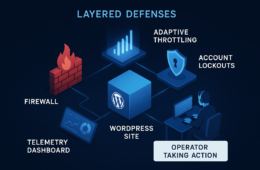
Plugins solve many problems, but they are not a complete defense-in-depth strategy. For IT generalists responsible for uptime, patching, and incident response, the core question is not whether a plugin can detect threats—it’s how you limit what a successful exploit can do. This roadmap shows steps you can implement today (quick wins) and deeper architecture and process changes (deep fixes) to reduce incident blast radius with practical monitoring and recovery playbooks.
- Why relying on plugins is risky
- How do you reduce blast radius when a plugin is compromised?
- Core principles: monitoring, containment, recovery
- Quick wins: low-effort controls you can implement today
- Deep fixes: architecture and process changes
- Incident mini-case study: containment that saved uptime
- Actionable checklist: a minimal playbook for reducing blast radius
- How to implement these controls with tool-assisted automation
- Implementing with Hack Halt Inc.
- Where to go next
- FAQ
Why relying on plugins is risky
Plugins are useful for detection, WAF-style filtering, or convenience features, but they typically run with the same PHP process and filesystem privileges as WordPress itself. That shared context means a single compromised plugin can write web-shells, modify other plugins, create admin users, or persist backdoors. If your recovery approach assumes only the plugin is bad, you risk missing lateral movement and persistence.
How do you reduce blast radius when a plugin is compromised?
Reduce blast radius by limiting privileges, detecting anomalous behavior early, and automating short, safe containment steps while you prepare a verified restore. The combination of monitoring signals plus an executable recovery playbook shortens mean time to containment and reduces the set of systems an attacker can touch.
Core principles: monitoring, containment, recovery
Adopt these principles as part of your site hardening guide: minimize privileges, detect behavioral anomalies, contain fast and targeted, and favor verifiable recovery over ad-hoc cleanup. Those principles steer both quick wins and deep changes.
Minimize privileges
Run PHP workers and file owners with the least privilege possible. Where feasible, isolate critical directories (uploads, plugin installs) with stricter permissions and use separate accounts for deployment tasks.
Detect behavior, not just signatures
File hashes and known pattern matches catch old threats. To reduce blast radius, monitor behavior: sudden outbound POSTs to unknown hosts, unexpected CRON registrations, or new admin creation are better early warnings of an active exploit.
Contain, then investigate
Your immediate goal after detection is to constrain attacker options—disable write access for the affected plugin directory, revoke stale sessions, and block outbound traffic from PHP processes—then begin a validated investigation.
Quick wins: low-effort controls you can implement today
These are high-impact controls that require little architecture change and give you immediate reduction in blast radius.
Enable file integrity monitoring
Configure file integrity checks on core, wp-content/plugins, and wp-content/themes. Set alerts for modified core files and mass changes in plugin directories. Combine with automated minor containment: when a plugin directory shows unexpected writes, flip it to read-only at the filesystem level until an operator reviews.
Harden admin workflows
Audit admin accounts, enforce MFA, and enforce just-in-time admin elevation for privileged tasks. Lock down REST API endpoints and remove unused admin users promptly.
Monitor outbound connections
Alert on unexpected outbound connections from web processes. Many post-exploit actions require staging data exfiltration or callback, and outbound anomalies provide early detection for containment.
Deep fixes: architecture and process changes
Deep fixes take more time but substantially reduce the impact when a plugin fails.
Process isolation and least privilege
Move toward process isolation: run PHP-FPM pools per site with distinct users, or use container sandboxes where a compromised plugin cannot touch other sites or the backup store. Reduce filesystem breadth available to web processes.
Immutable deploys and validated artifacts
Adopt immutable deploys for core and production plugins. Use a build pipeline that signs plugin artifacts so you can verify running code matches the approved artifact and quickly roll back to known good versions.
Tested recovery playbooks
Create playbooks that specify exact restore points, which tables to restore, and post-restore validation steps. Test restores on staging clones and keep automated scripts for repeatable restores.
Incident mini-case study: containment that saved uptime
Situation: A store plugin with elevated file-write capability was exploited to drop a backdoor. Detection: File integrity alerts flagged rapid plugin-directory changes and an outbound POST to an unknown IP. Response: The on-call operator executed a containment playbook that set the plugin directory to read-only, revoked all admin sessions, and blocked outbound traffic for PHP processes. Recovery: A verified backup was restored to a staging clone and validated, then the production site was rolled back during a low-traffic window. Result: Partial storefront functionality was preserved while the exploit surface was eradicated, and time to containment was under 20 minutes because of predefined playbooks.
Actionable checklist: a minimal playbook for reducing blast radius
- Enable file integrity monitoring for core and wp-content and route alerts to your incident channel.
- Configure outbound connection alerts for web processes and set thresholds for rapid notification.
- Create a one-click containment action: set affected plugin directory to read-only and revoke PHP worker writes.
- Maintain a verified backup rotation and an automated restore script that runs on a staging clone for validation.
- Assign an on-call owner for WordPress incidents and maintain communication templates for ops and customers.
- Monthly: test a full restore and runbook end-to-end on a staging environment.
How to implement these controls with tool-assisted automation
Where you choose automation, prioritize safe default actions: automated alerts and low-risk containment (e.g., disable plugin execution, isolate sessions) rather than destructive full restores. When a trusted vendor executes automated steps, ensure manual approval for high-risk actions unless your RTO requires otherwise.
Integrate monitoring signals
Correlate file integrity events with outbound anomalies and account activity to reduce false positives. A single signal rarely justifies a high-impact action; correlated signals can trigger automated containment.
Keep recoveries repeatable
Script restore steps and include verification checks (hashes, smoke tests). Ensure backups are immutable and isolated from web-writeable locations so an attacker cannot delete or tamper with your last known good copies.
Document and train
Run quarterly tabletop exercises using your playbooks so responders can practice containment and validation without the pressure of a live incident.
Implementing with Hack Halt Inc.
To make these controls operational fast, consider implementing monitoring and automated containment features through Hack Halt Inc. as part of your controls suite; the product supports file integrity monitoring, automated containment playbooks, and tested recovery workflows that map directly to the checklist above. Learn more and get started at Hack Halt Inc. pricing.
Where to go next
Read technical guides and related playbooks to build a complete defense-in-depth strategy. Start with our detailed operator blueprint on plugin exploit risk, then layer in the full incident response and remediation playbooks.
Related reading: How WordPress Hacks Actually Happen: An Operator Blueprint to Reduce Plugin Exploit Risk, the layered defense guide Fight Back: Layered Defense Against WordPress Malware & Web Shells, and our comprehensive checklist Battle-Tested WordPress Security Checklist. When a control maps to a feature in the Hack Halt platform, consult the product documentation for implementation details and recommended configurations.
FAQ
What immediate steps stop a plugin from spreading after detection?
Immediately restrict the plugin directory to read-only, revoke active sessions for suspicious accounts, and block outbound connections. These targeted steps reduce the attacker’s ability to persist or exfiltrate while you prepare a safe restore.
How often should I test recovery playbooks?
Test recovery playbooks monthly for high-risk sites and quarterly for lower-risk properties. Tests should be full restores to staging with smoke-test validation to ensure the playbooks work under pressure.
Should I automate restores?
Automate low-risk restores for static content and automated validation. For full-site restores that affect databases or transactions, prefer semi-automated flows with operator approval to avoid data loss or inconsistent states.
How do I keep backups safe from a compromised plugin?
Store backups outside the web server’s write scope and keep at least one immutable backup copy. Limit access to backup tooling to a separate account and log all backup and restore actions for auditability.
If you are responsible for uptime and patching, begin with the quick wins above today and schedule the deep fixes into your next operations sprint. Reducing blast radius is not a one-time hardening task—it’s an operational pattern of monitoring, scripted containment, and verified recovery. For hands-on implementation and product-level automation, review Hack Halt Inc.’s offerings and documentation to map these playbooks to your environment.